Guru vs Slite's Knowledge Suite - A 2025 Detailed Comparison
Guru and Slite's Knowledge Suite promise to be your company's all-in-one for documentation and enterprise search. Which one actually works?
Guru is an all-in-one knowledge management platform that combines enterprise search, wiki, and intranet capabilities with AI-powered Knowledge Agents that deliver verified, cited answers across 100+ connected data sources.
The Knowledge Suite is Slite's bundled offering that pairs Slite's knowledge base (with AI-powered verification and document lifecycle management) with Super's enterprise search (connecting 20+ tools with advanced orchestration for digests, bulk processing, and custom assistants).
Since both platforms promise to solve the scattered knowledge problem, teams evaluating enterprise knowledge management often compare them.
I tested both products' enterprise search by connecting them to our company's actual tools, asking the same 15 questions to each platform, and tracking answer quality, speed, source attribution, and usability. This article documents what I found in capability, accuracy, pricing, and which teams get the best ROI from each approach.
What these tools are
Guru
Guru positions itself as "Your AI Source of Truth" and bundles three products into one platform: enterprise search, company wiki, and intranet.
You can use it to:
- Search across 100+ connected data sources with AI-powered Knowledge Agents
- Create and verify documentation with subject matter expert review workflows
- Build internal company pages and org charts
- Access knowledge through browser extensions, Slack, Teams, and ChatGPT integration
Guru's design centers on verified knowledge with expert review. Content creators build "Guru Cards" that subject matter experts verify at configurable intervals, creating what Guru calls a "Trust Score." The platform is built for mid-sized to enterprise teams (typically 50+ employees) who want an all-in-one solution rather than connecting existing tools.
Knowledge Suite
The Knowledge Suite combines two focused products: Slite for documentation and Super for search.
You can use Slite to:
- Build a consolidated company wiki for your team
- Mark knowledge as verified or outdated
- Write with AI-powered editor and 1-click improve your doc formatting
- Get AI-suggested actions to help maintain knowledge at scale
- Use collections to organize docs with shared attributes and customizable properties
You can use Super to:
- Create verified documentation in Slite with AI assistance and expiration tracking
- Search across 15+ external tools (Slack, Google Drive, Confluence, GitHub, Linear, Hubspot etc.) with Super
- Build custom AI assistants tied to specific data sources and Slack channels
- Automate recurring reports with Digests and batch-process questions with Bulk Mode
- Embed contextual AI buttons in web apps like Intercom
The Knowledge Suite's design philosophy treats documentation and search as separate problems requiring different solutions. Slite handles what should be official and verified. Super finds everything else across your existing tool stack. The platform is designed for teams (20-500 employees) who want to keep using tools that already work while adding a knowledge layer on top.
Testing methodology
I tested both of them for the particular use case of enterprise search. I did this by connecting Guru and Super to Slack and Google Drive and asking them the same 15 questions.
Judgement criteria and grading system
2 factors determine the quality of an enterprise search tool
- Answer accuracy - The core function is helping you find information accurately. If they hallucinate facts, they're more destructive than helpful in terms of business impact.
- Response time - If one tool takes 30 seconds vs. 30 mins, which would you actually use daily? Fast tools get adopted. Slow tools get abandoned because it's faster to search yourself.
And from it, I did a 4-point rating system, 4 being the highest and 1 being the lowest
- 4 - Fully accurate: Answer's correct, comprehensive, cited, well-formatted
- 3 - Accurate with minor blindspots: The answer is accurate while omitting a few things (1 value prop out of 5, etc.)
- 2 - Partly Correct: The answer has some correct fragments mixed with some incorrect/outdated information
- 1 - Incorrect: The answer is false or contradicts sources.
Types of questions
- Simple queries - Finding specific pieces of information verbatim from your knowledge sources
- Medium broad knowledge - Understanding company context and semantically connecting different information sources
- Complex step-by-step queries - Planning research, collecting data points, synthesizing them, and deriving an answer
- Meta queries - Understanding metadata (like "Who's the most active person in our team Slack?")
- Data queries - Testing retrieval accuracy of hard facts for reporting or analysis
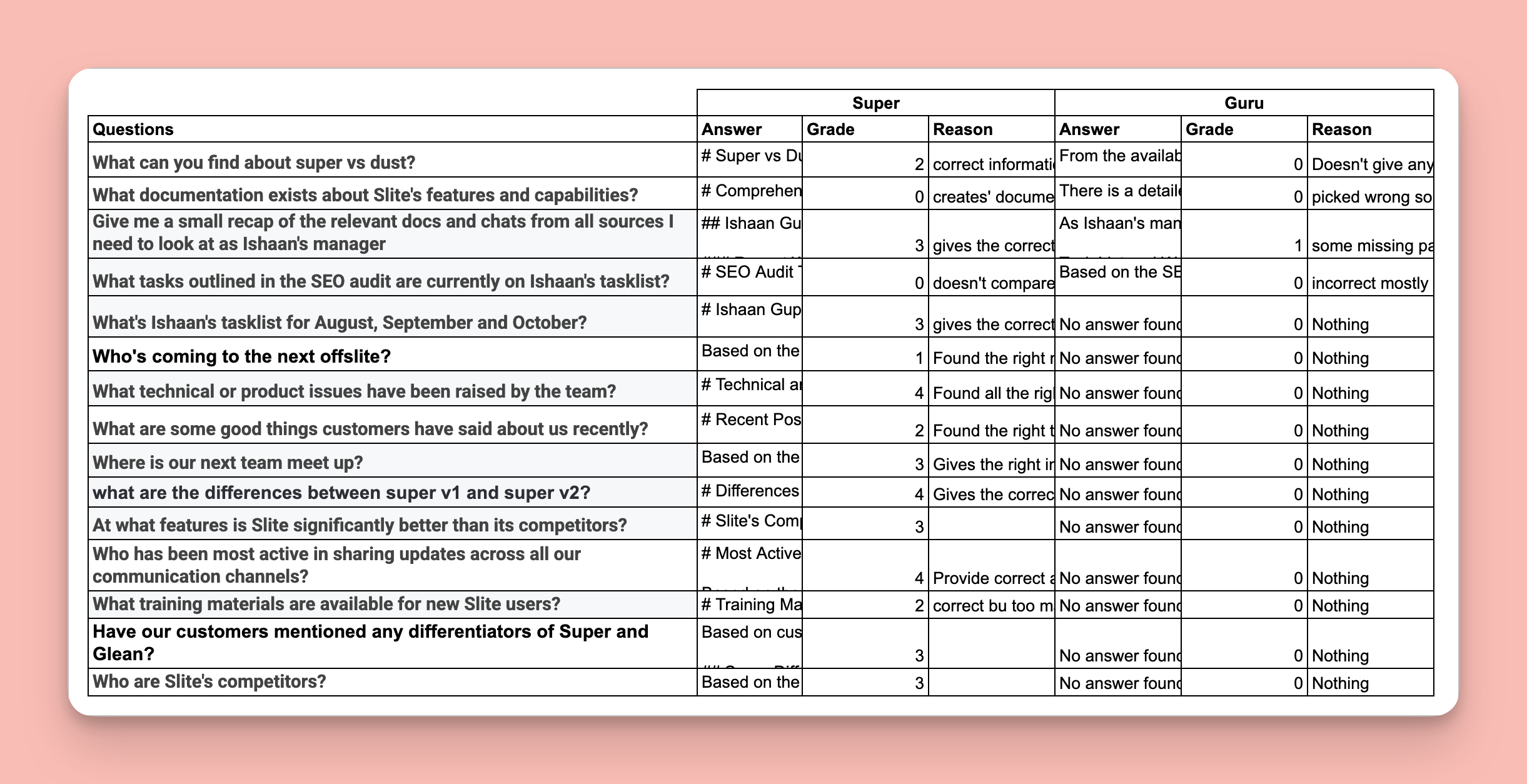
This is how my testing sheet looked in the end:
Test results
Super averaged 2.1/4 on accuracy across 15 questions. Guru averaged 0.3/4 on accuracy.
Here are all 15 questions with response times and quality scores:
| Super | Guru | |||||
|---|---|---|---|---|---|---|
| Question | Time(s) | Score | Details | Time(s) | Score | Details |
| What can you find about super vs dust? | 39s | 2/4 | Found correct info but buried in irrelevant fluff | 28s | 0/4 | Couldn't find anything despite Slack integration |
| What documentation exists about Slite's features? | 43s | 0/4 | Created documentation instead of finding it | 31s | 0/4 | No answer, couldn't search Google Drive |
| Give me a recap of relevant docs and chats as Ishaan's manager | 41s | 3/4 | Correct information, no issues | 25s | 1/4 | Only found manually-added Cards, missed Slack/Drive |
| What tasks from the SEO audit are on Ishaan's tasklist? | 58s | 0/4 | Didn't compare the two sources needed | 35s | 0/4 | Didn't find the SEO audit to compare |
| What's Ishaan's tasklist for August, September and October? | 61s | 3/4 | Correct info, refers to both sources | crash | 0/4 | Failed to search connected tools |
| Who's coming to the next offsite? | 35s | 1/4 | Partial info, missing full attendee list | - | - | No access to relevant Slack discussions |
| What technical or product issues have been raised by the team? | 47s | 4/4 | Comprehensive answer with clear sources | fail | 0/4 | Couldn't search Slack or Linear effectively |
| What are some good things customers have said about us recently? | 52s | 2/4 | Found some quotes but incomplete | - | - | No access to customer conversation tools |
| Where is our next team meet up? | 29s | 3/4 | Correct location and date | fail | 0/4 | Couldn't find information in Slack |
| What are the differences between super v1 and super v2? | 44s | 4/4 | Detailed comparison with sources | - | - | No access to product documentation |
| What features is Slite significantly better than its competitors? | 58s | 3/4 | Good comparison, missing some context | - | - | Couldn't search competitive docs |
| Who has been most active in sharing updates across all our communication channels? | 38s | 4/4 | Correct answer with activity metrics | - | - | Cannot analyze Slack activity |
| What training materials are available for new Slite users? | 42s | 2/4 | Found some materials, incomplete list | - | - | Couldn't search Drive or wiki |
| Have our customers mentioned any differentiators of Super and Glean? | 49s | 3/4 | Found relevant feedback with sources | - | - | No access to customer conversations |
| Who are Slite's competitors? | 31s | 3/4 | Accurate list with context | - | - | Couldn't search market research docs |
Summary
Super (Knowledge Suite) delivered functional enterprise search with a 2.1/4 average accuracy.
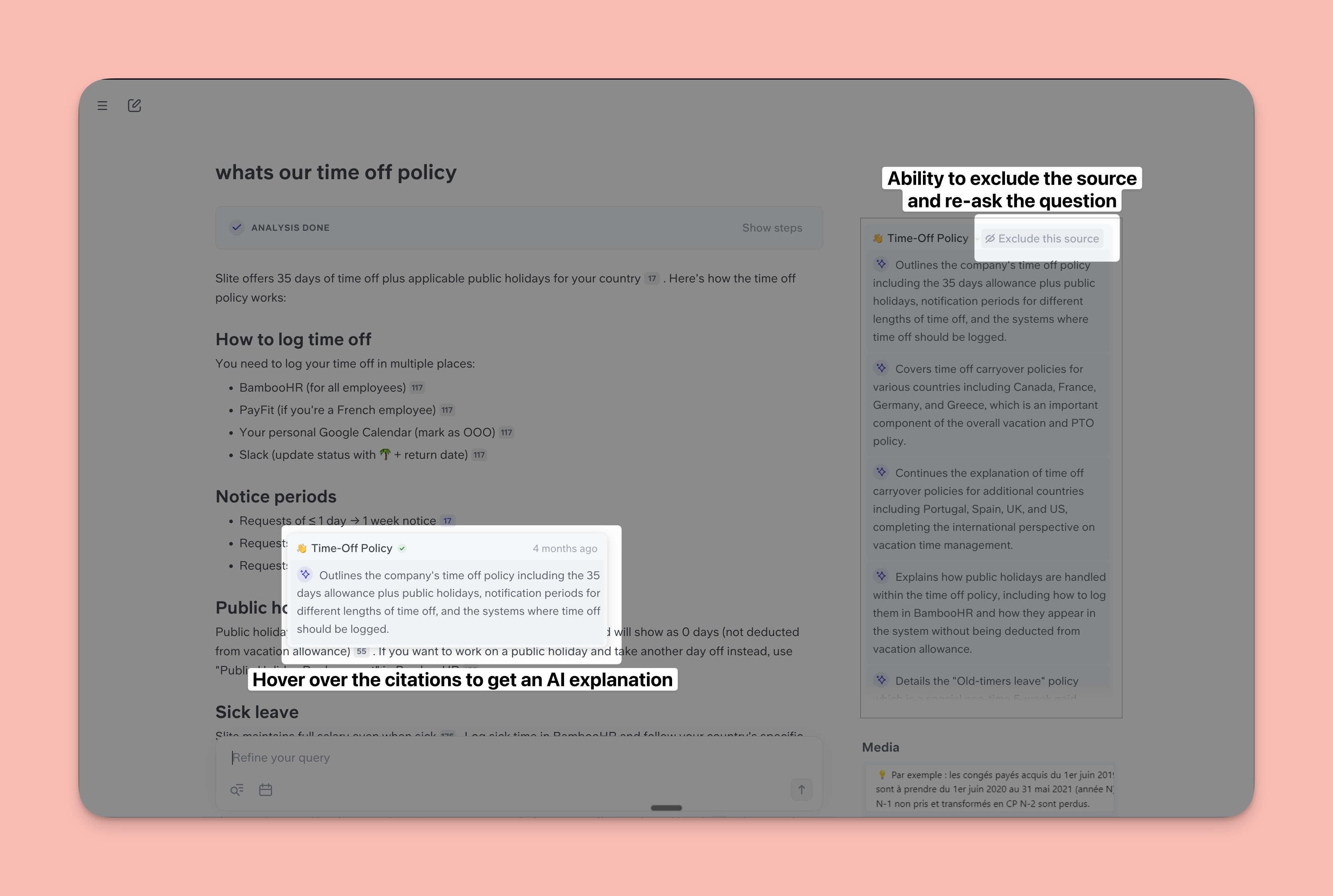
The platform successfully answered 13 of 15 questions with varying degrees of completeness. It excelled at questions requiring synthesis across multiple sources, finding technical discussions in Slack, and tracking activity patterns. It struggled with questions about non-existent documentation and specific task lists not clearly tracked in the connected tools, which is a great thing because you can be rest assured that Super won't hallucinate. Super even has better citations which you can deep dive into or exclude if irrelevant
Guru failed as an enterprise search solution with a 0.3/4 average accuracy.
The platform could only attempt 5 of the 15 questions, and of those attempts, it provided useful answers to only 1 question partially. Guru consistently failed to search external tools effectively, couldn't find information in connected Slack channels or Google Drive, and often returned no answer or completely irrelevant responses.
The testing reveals Guru's fundamental flaw: despite advertising 100+ integrations, it cannot actually search those tools effectively.
Questions that required finding information in Slack, Google Drive, or Confluence - the core promise of "enterprise search" - consistently failed. Guru only succeeded when information had been manually added to Guru Cards, making it a knowledge base rather than a true search tool.
For teams evaluating these platforms,
Super delivers, while Guru requires cannot reliably search external sources despite its integration claims.
Data sources
Knowledge Suite (Super) connects to 20+ data sources: Google Drive, Linear, Slack, SharePoint, Jira, Confluence, Notion, GitHub, Git, Public Help Center, Files, Custom sources, Hubspot, Attio, Asana, and Intercom. Super indexes all metadata and content with deep integrations that respect existing permissions.
Guru connects to 100+ data sources including Google Drive, Slack, Confluence, Salesforce, Zendesk, SharePoint, GitHub, Teams, and major enterprise applications. Guru also supports Model Context Protocol (MCP) for connecting to ChatGPT, Claude, and other AI tools.
However, testing revealed a critical distinction: while Guru advertises 100+ integrations, it cannot effectively search most external sources. Super's 20+ integrations actually work for deep search across connected tools.
Entry points and accessibility
Knowledge Suite works through five interfaces:
- The Slite web app for documentation
- The Super web app for search
- Direct Slack access by typing "@super,"
- A browser extension for searching from any webpage
- Contextual buttons embedded in web apps like Intercom.
Guru works through four interfaces:
- Browser extensions
- Native Slack and Teams bots
- Web app access
- MCP integration allowing access from ChatGPT, Claude, Cursor, and other AI tools.
Guru emphasizes workflow-embedded access where knowledge follows employees rather than requiring them to visit a separate portal.
Both platforms support API access for custom integrations with Zapier, n8n, and other automation tools.
Both platforms prioritize meeting teams where they work rather than forcing portal visits. Knowledge Suite adds unique contextual automation through embedded buttons, while Guru adds unique AI tool integration through MCP. (MCP integration to Knowledge Suite is coming soon)
Knowledge management approach
Knowledge Suite splits knowledge management into two products with different purposes. Slite handles official documentation with AI-powered suggestions for outdated content, expiration notifications, and a Knowledge Management Panel that provides bulk actions and intelligent filtering. Content stays in Slite's intuitive hierarchical channel structure.
Super doesn't require knowledge management because it searches your existing tools directly, respecting their native organization and permissions.
Guru uses a card-based structure where all knowledge lives as "Guru Cards" within Guru's platform. Subject matter experts verify cards at configurable intervals, and the platform tracks verification status with a "Trust Score." When cards aren't verified on schedule, Guru sends automated reminders. The system includes auto-archive for stale content and duplicate detection. However, this requires moving knowledge into Guru rather than searching tools where information already exists.
Knowledge Suite separates documentation (managed in Slite) from search (finds everything else across existing tools). Guru centralizes everything into its own platform with card-based organization.
Knowledge Agents and Assistants
Both platforms let you create customized AI helpers, though they work differently.
Guru Knowledge Agents
Guru's Knowledge Agents are AI assistants trained exclusively on company-verified knowledge and configured for specific teams or workflows. You pick which Guru Cards and connected data sources the agent can access, then deploy it in Slack, Teams, the browser extension, or through MCP to AI tools like ChatGPT.
For example, you could create a customer support agent with access to product documentation cards, support ticket history, and knowledge base articles. Support reps ask questions, and the agent provides verified answers with source citations. According to Guru, Shopify uses Knowledge Agents in 60% of support interactions.
Agents can only be as good as the knowledge available to them, and since Guru cannot reliably search connected tools, agents are limited to manually-created Guru Cards.
Knowledge Suite (Super) Assistants
Super Assistants work differently. You pick specific data sources from your connected tools (not Guru Cards, but actual Slack channels, Google Drive folders, Confluence spaces, etc.), give instructions on task and response format, then deploy the assistant.
The unique capability is channel-specific automation. You can tie a Super assistant to a specific Slack channel where it automatically provides help when needed. For example, you create a customer support assistant with access to your help center, recent bug fixes, and product docs, then tie it to your customer support Slack channel. When your rep has a question they don't know the answer to, the assistant automatically jumps in with latest information from your pre-defined data sources in a format your support rep can use.
Assistants also dynamically sync to data sources. If you ask "What are the last 5 deals in the pipeline?", you get the actual latest deals because the assistant is connected to your CRM with real-time data, not a static knowledge base.
Guru Knowledge Agents are limited by Guru's inability to search external sources, making them dependent on manually-created cards. Super Assistants connect to actual data sources with real-time information and automated workflows.
Unique features: Guru
Guru offers several capabilities specific to its all-in-one approach:
1. Intranet and company pages
Guru includes intranet functionality where you can build custom Pages serving as branded landing pages for different teams. These pages combine knowledge cards, announcements, org charts, and navigation in a visual hub. You can create pages for department-specific resources or company-wide information.
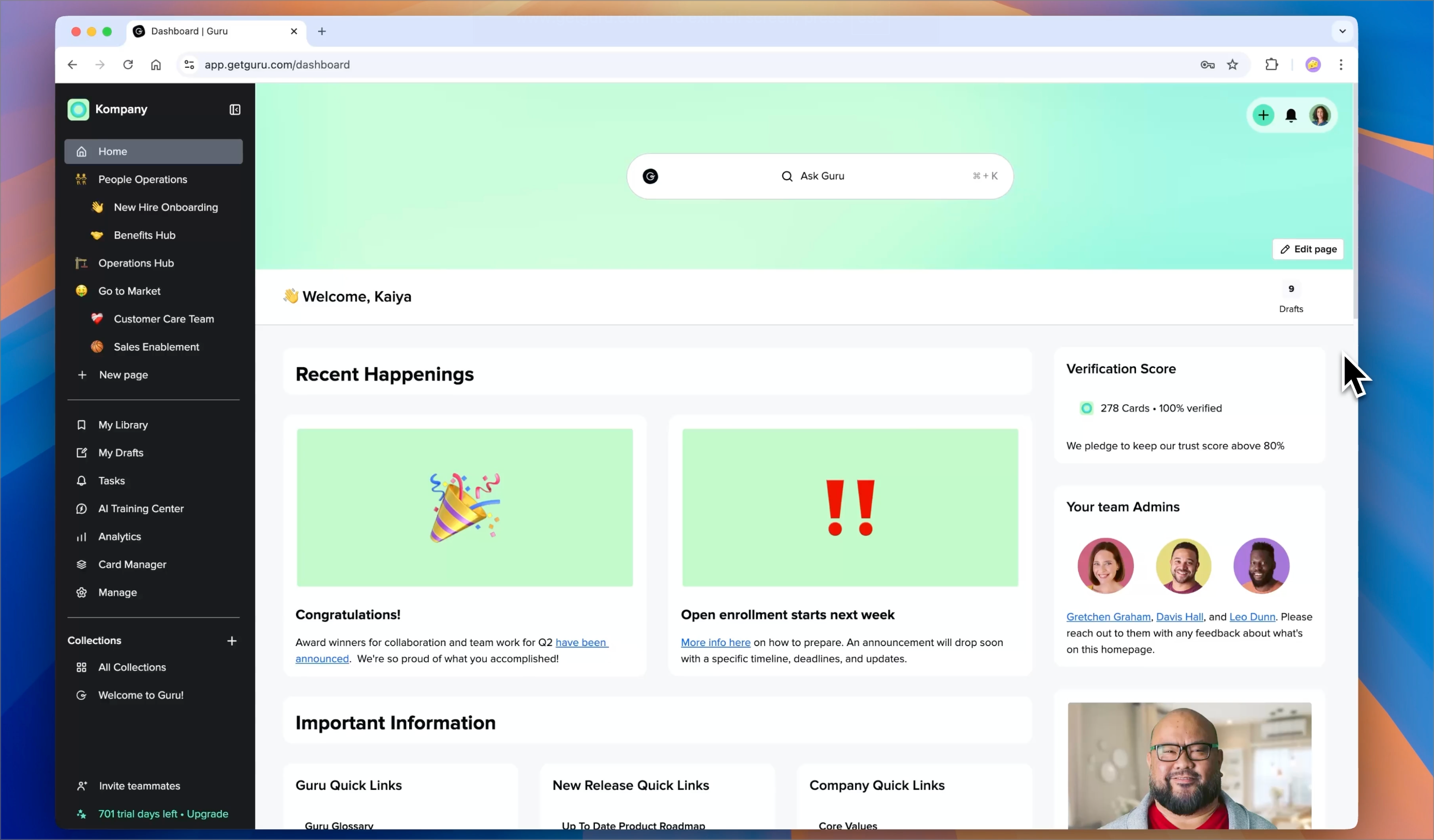
Teams using Guru get intranet capabilities bundled into their knowledge management spend rather than paying separately for tools like SharePoint or a dedicated intranet platform.
2. Org chart and HRIS sync
Guru automatically syncs employee data from HRIS systems like BambooHR, Rippling, and Gusto to build visual org charts showing company structure with employee profiles. The org chart integrates with Guru's search, so asking "Who handles X?" surfaces the right person with their role, team, and contact information.
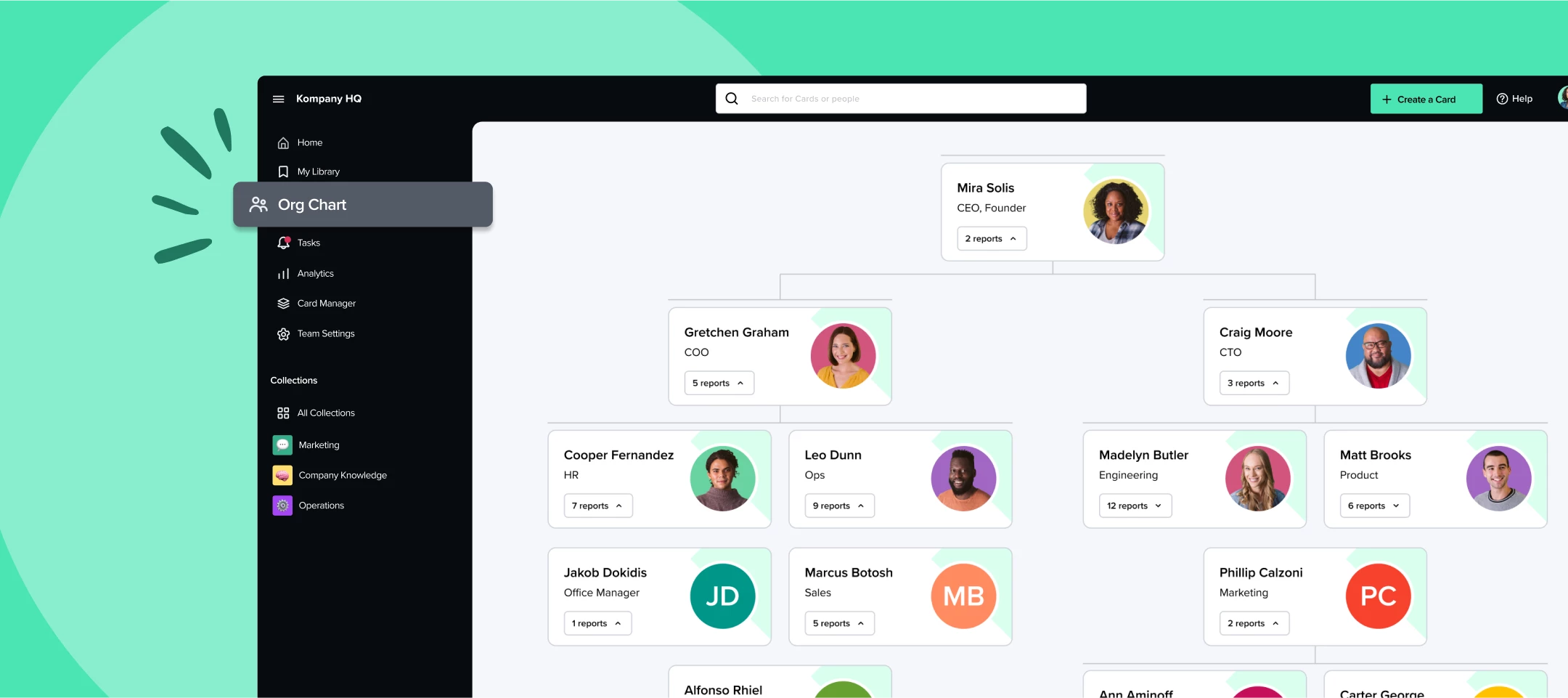
This eliminates manually maintaining employee directories and makes it easy to find the right person for any question.
3. Announcements with read receipts
Guru Announcements let you broadcast important updates with read receipts confirming who has seen the message. You can target announcements to specific teams or user groups and track engagement.
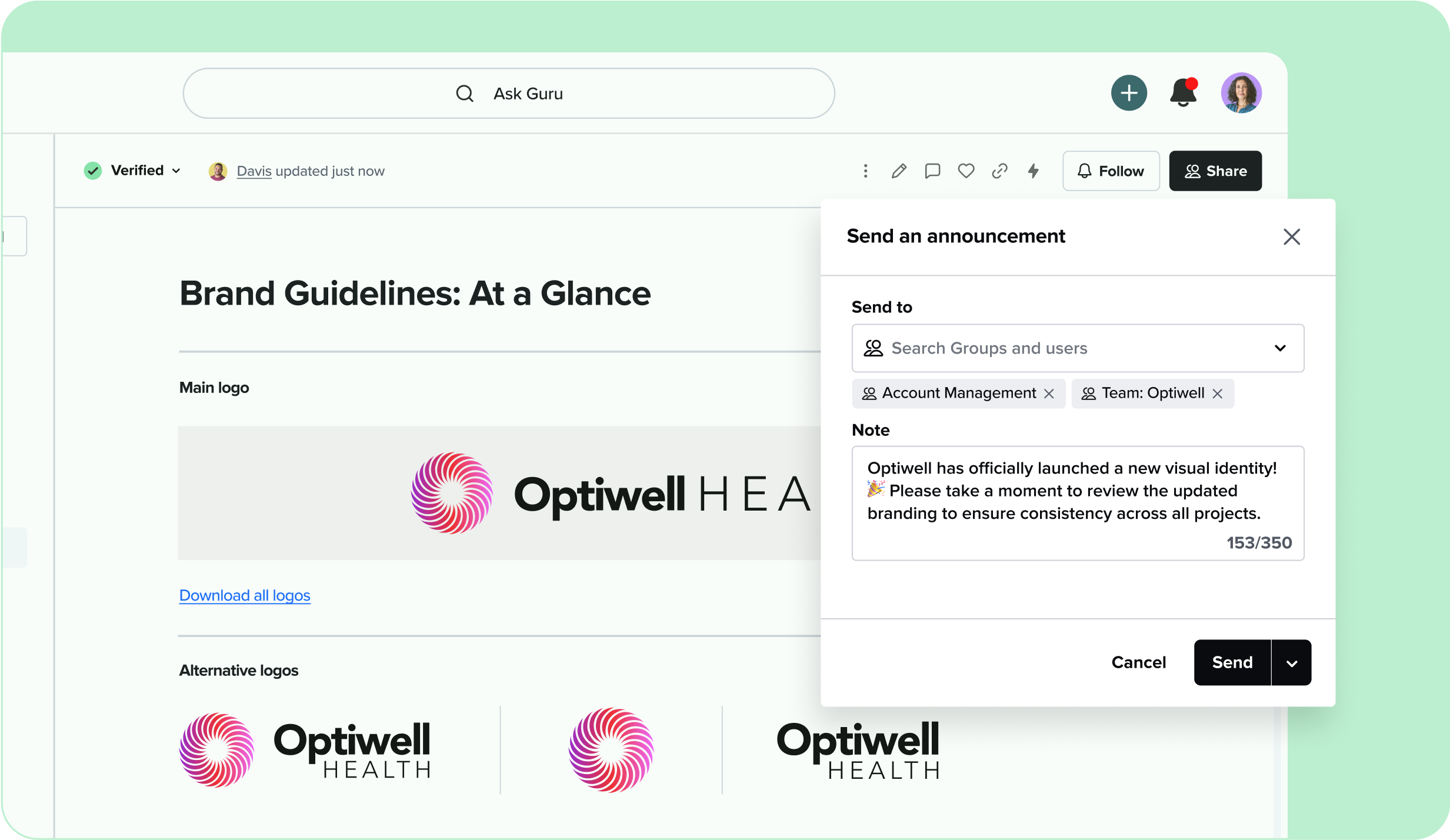
For critical updates like policy changes or incident notifications, this ensures accountability that messages were received. Many knowledge bases lack this communication layer entirely.
4. Research Mode
Guru's Research Mode transforms complex questions into structured reports scanning thousands of records with inline citations. Instead of getting a simple answer, you get a comprehensive analysis of information across your knowledge base.
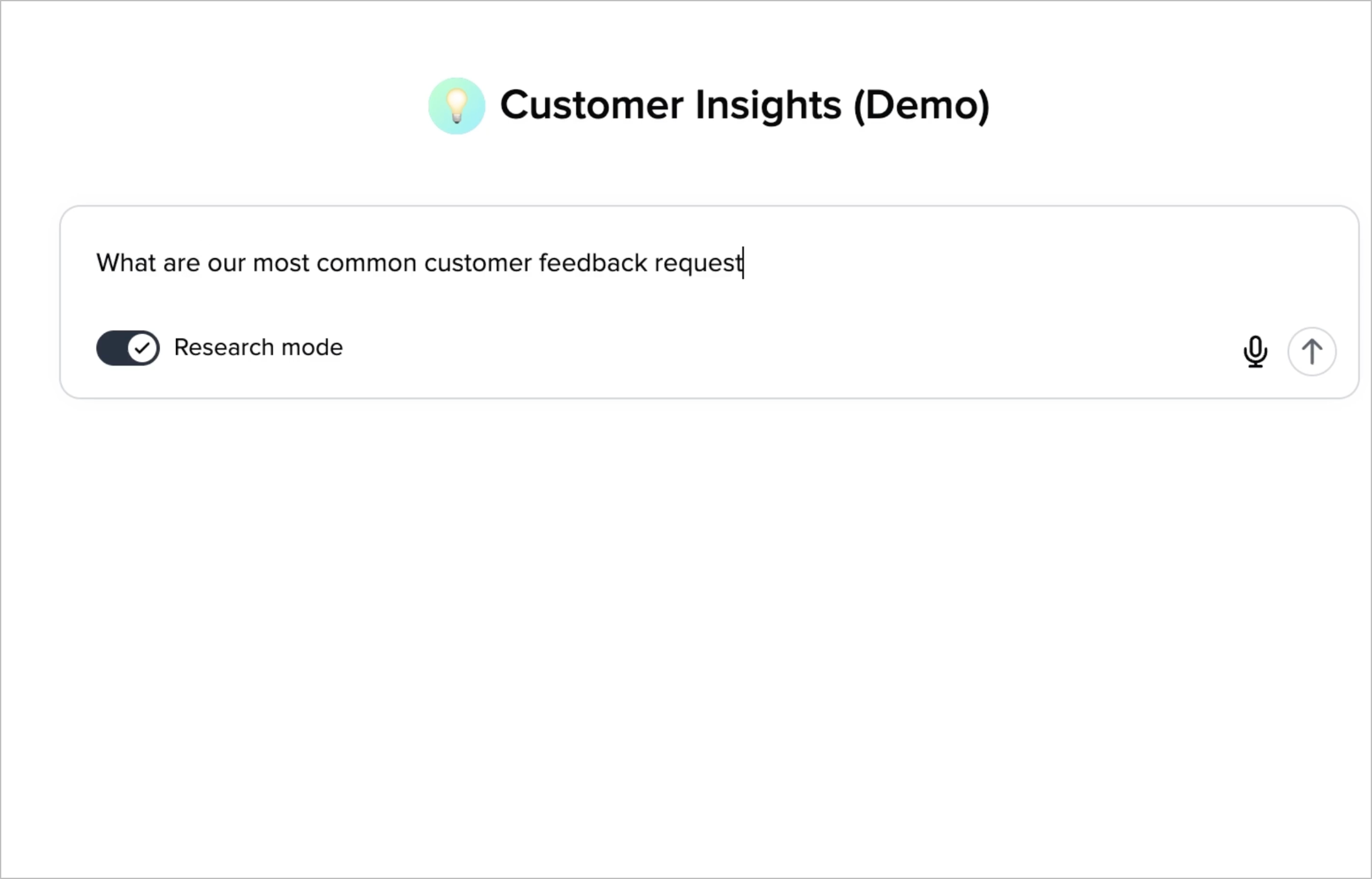
While Guru advertises this as a separate feature, you get the same level of depth - if not more - with Super's standard search.
Unique features: Knowledge Suite
The Knowledge Suite offers capabilities specific to its two-product approach and tool-agnostic design:
1. Digests (Super)
Super Digests are automated AI-powered reports that pull from multiple sources and deliver regular updates without manual effort. You set your data sources and format, then get reports periodically via Slack or email.
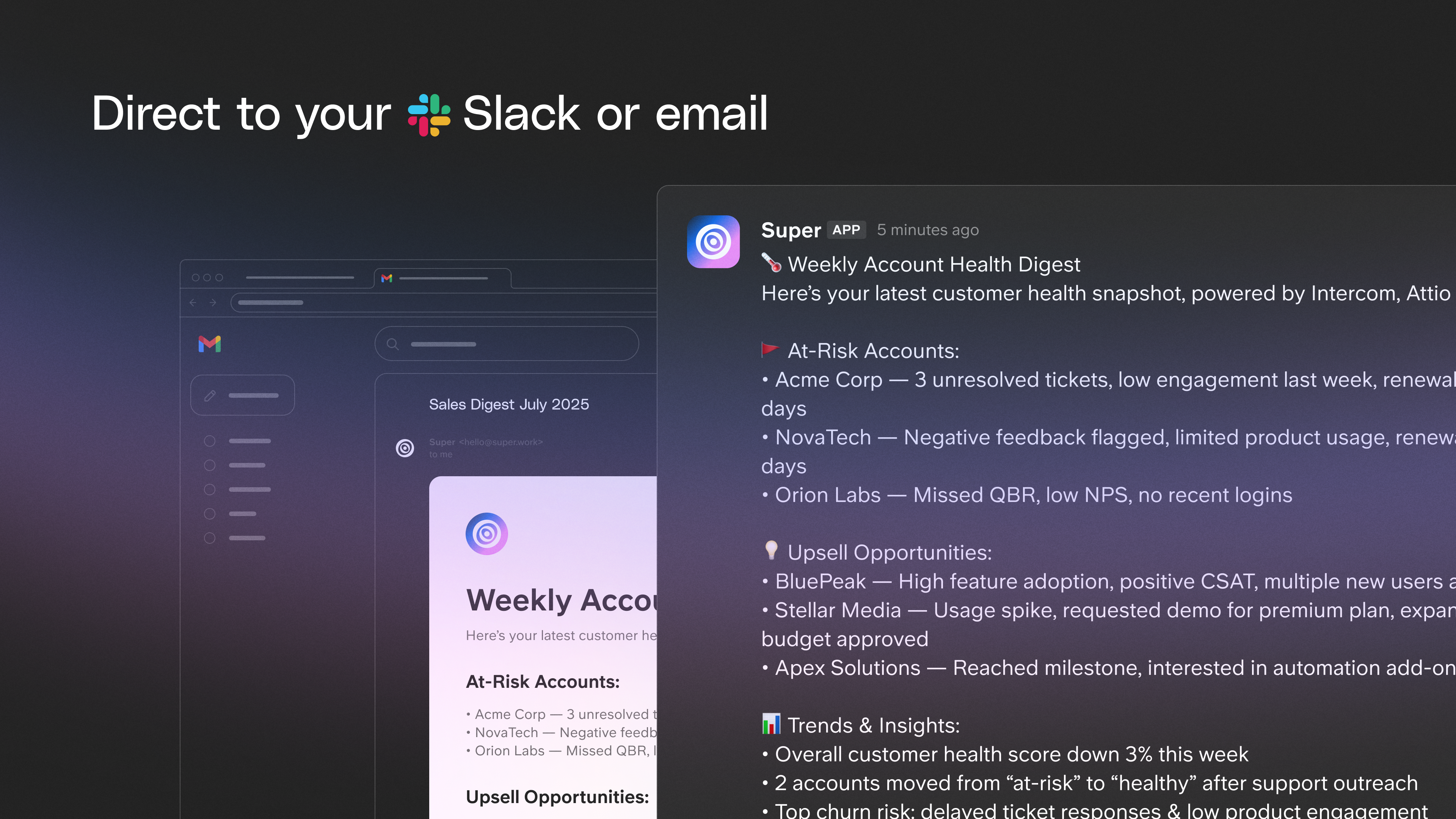
For example, an AE who previously manually summarized her weekly deals every Monday now has Super do it automatically and send it to leadership before the week starts. Previously this took 30-45 minutes of manual work each week. Now it happens automatically.
Digests differ from Assistants because they're automated reports that run on a schedule, while Assistants respond to specific questions.
2. Bulk Mode (Super)
Super Bulk Mode lets you paste 10-1000 questions and get answers in one batch instead of processing them one by one. Questions that would've taken hours to answer manually by digging through docs and following up with teams can be answered in bulk.
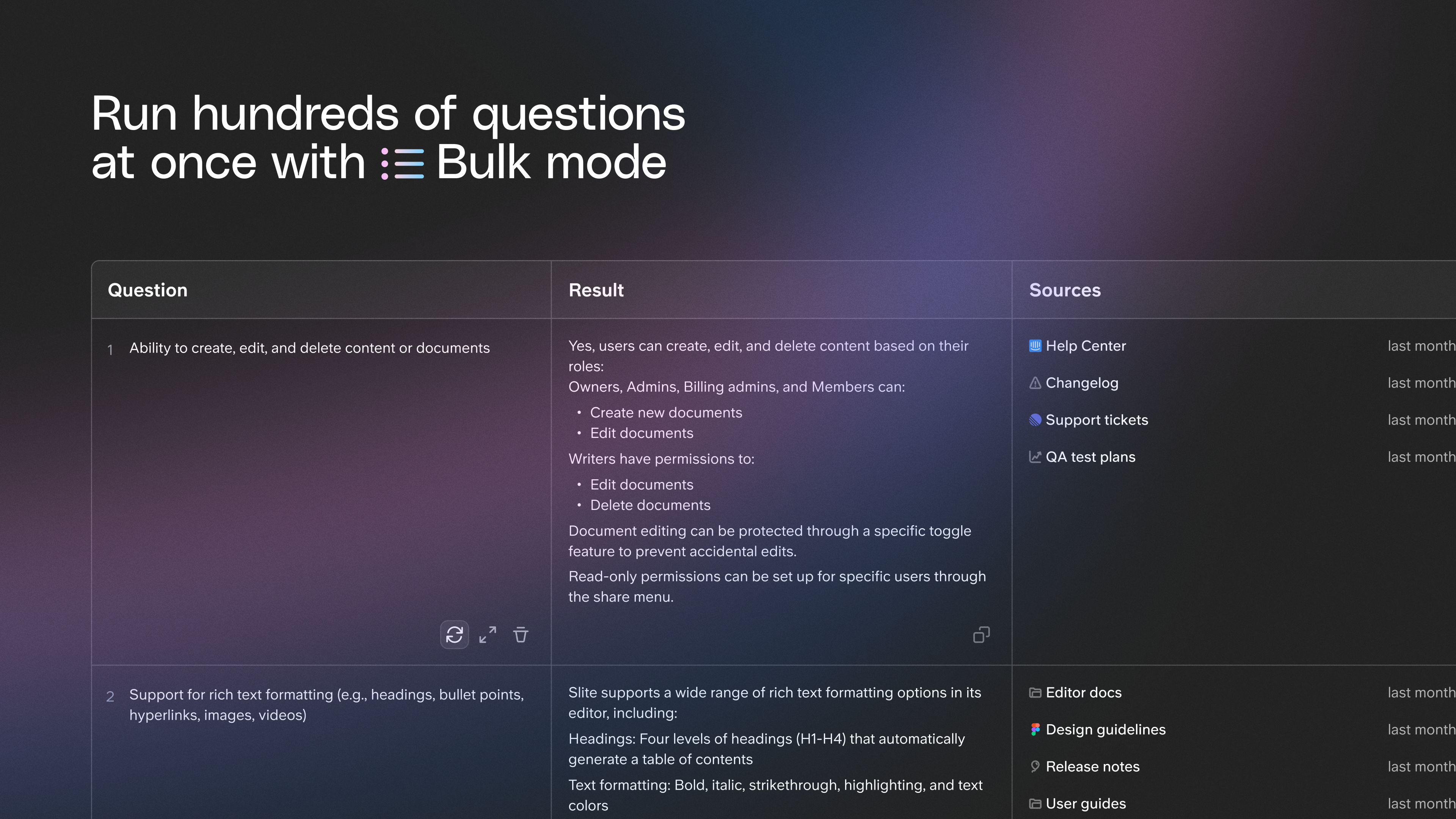
Use cases include RFPs (Request for Proposals), security questionnaires, or any scenario with hundreds of questions on a deadline. One team used Bulk Mode to answer a 200-question security questionnaire in under an hour, a task that previously took 3 days of back-and-forth.
3. Contextual Buttons (Super)
Super Contextual Buttons are AI-powered interface elements you embed in web apps like Intercom, Zendesk, or your own tools. The button reads what's on the page (account details, conversation history), adds context from your connected sources, then executes predefined actions.
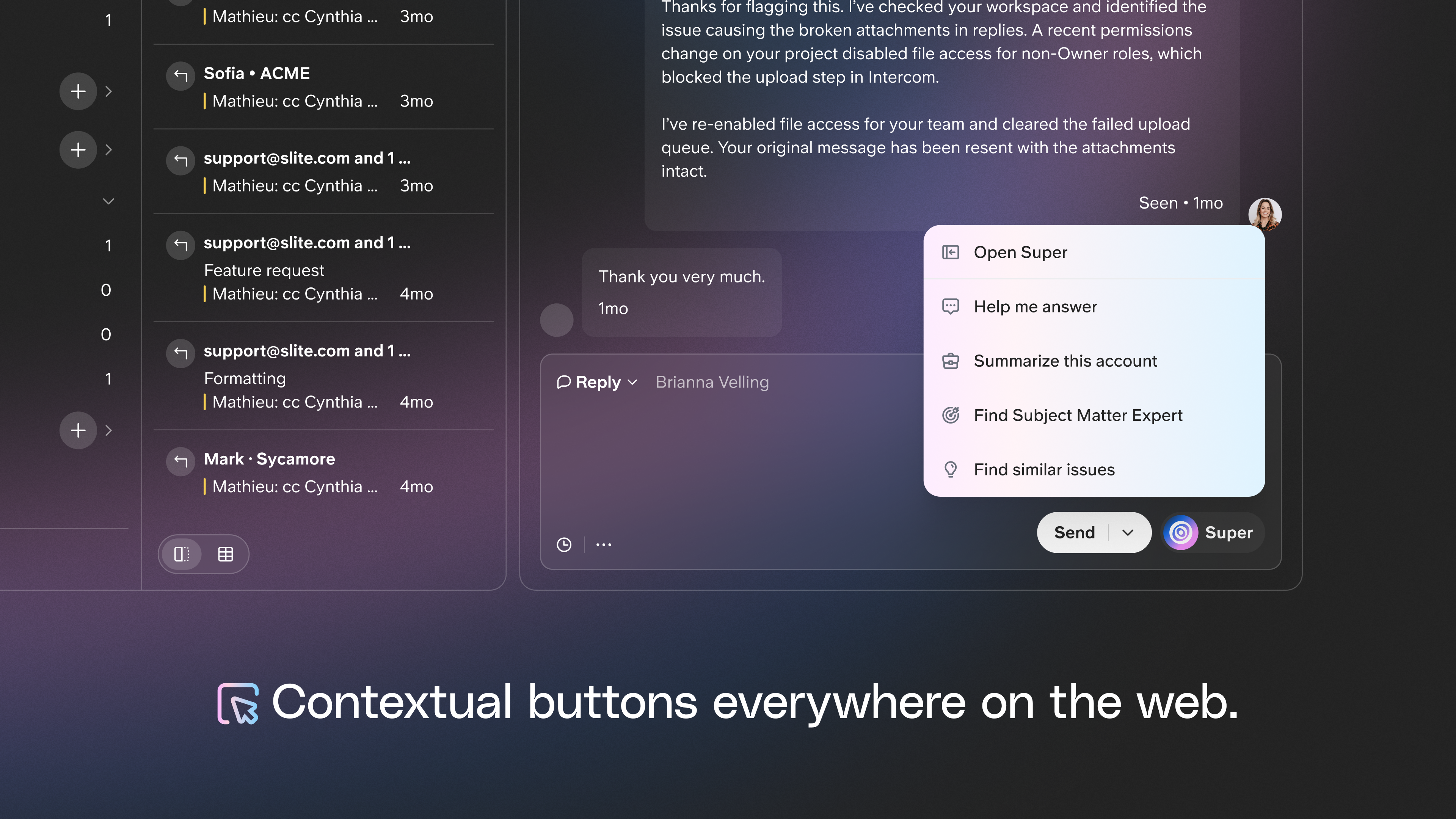
For example, you configure an Intercom button that grabs conversation context, gathers correct information from your help center and recent bug fixes, generates a response in your tone, and pastes it where you need it. Support reps get AI-drafted responses that pull from actual company knowledge without leaving their support tool.
Actions include summarizing conversations, surfacing notes, drafting replies, finding similar issues, and identifying subject matter experts.
4. Slite's Knowledge Management Panel
Slite includes an AI-powered Knowledge Management Panel that helps maintain documentation at scale. It provides bulk actions, AI suggestions for content improvements, and intelligent filtering to find outdated or duplicate content.
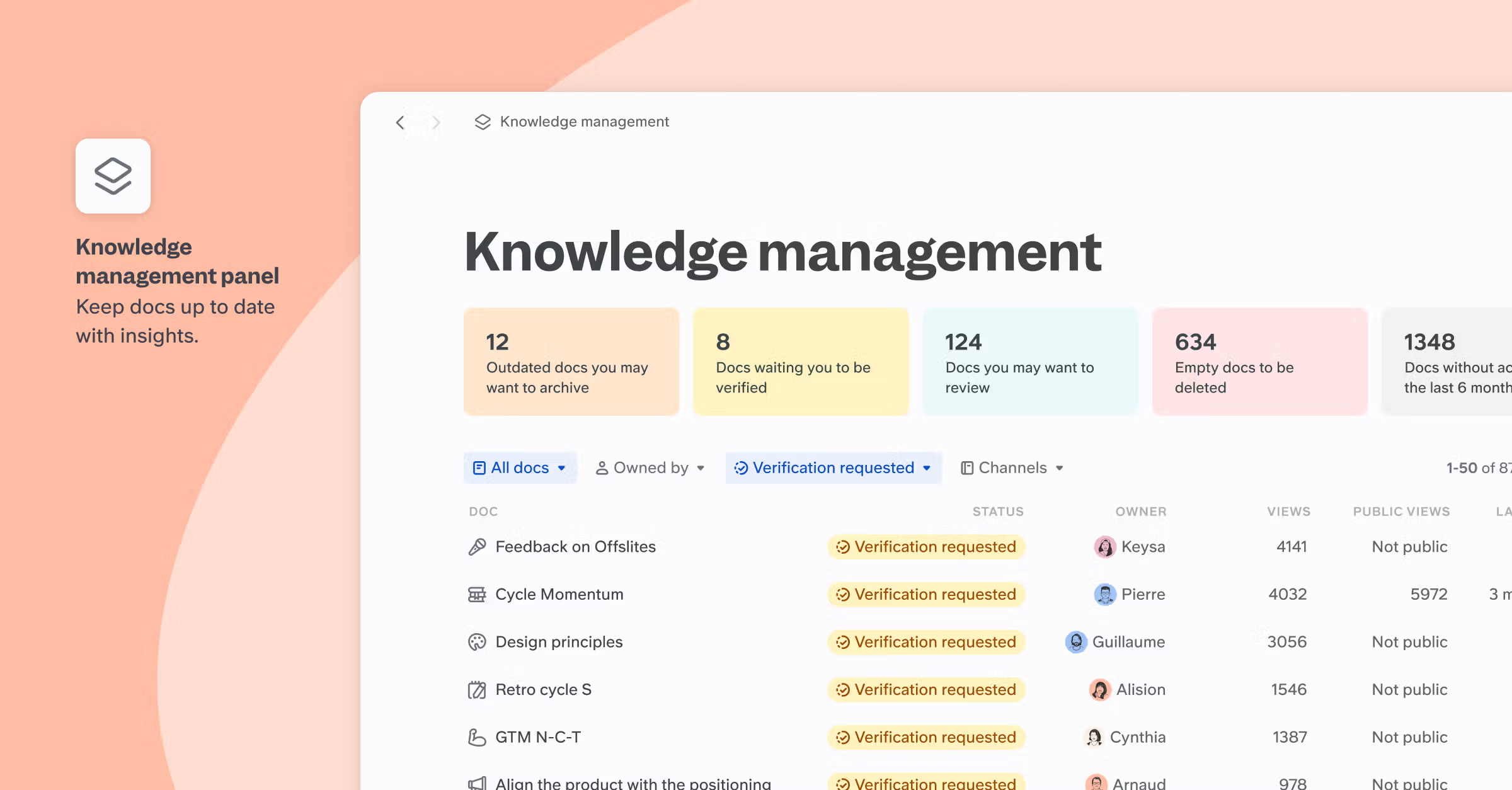
The panel analyzes your documentation and surfaces issues like documents that haven't been updated in 6+ months, duplicate content across channels, or incomplete documentation that needs expansion. You can take bulk actions rather than manually reviewing every document.
This proactive knowledge maintenance is something Guru handles through verification reminders, but Slite's approach uses AI to identify issues rather than relying solely on scheduled reviews.
Pricing
Knowledge suite pricing
Knowledge Suite costs $20 per user per month billed annually or $25 per user per month billed monthly. This includes full access to both Slite (documentation) and Super (enterprise search). The bundle represents a discount compared to purchasing Slite Standard ($8/user/month annually) and Super Core ($15/user/month annually) separately, which would total $23 per user per month.
Knowledge Suite offers a 3-week free trial after talking to sales. Book a demo here.
Guru's pricing
Guru costs $25 per user per month billed annually or $30 per user per month billed monthly with a minimum of 10 users. This includes Guru's full platform: Knowledge Agents, wiki, intranet, analytics, and integrations with 100+ tools.
Knowledge Suite costs $20/user/month annually vs Guru's $25/user/month annually, being 20% cheaper.
The choice
Super (Knowledge Suite) delivers functional enterprise search that finds information across connected tools, while Guru fails at its core promise, functioning only as a knowledge base for manually-created content.
Guru makes sense only if you're willing to manually migrate all knowledge into Guru Cards and don't actually need enterprise search.
The platform offers intranet features (company pages, org charts, announcements) useful for teams starting fresh. Guru's marketing claims of 100+ integrations are misleading; testing showed it cannot effectively search Slack, Google Drive, or Confluence despite advertising these connections.
Knowledge Suite delivers what teams need: search that finds information where it already exists.
Testing showed Super consistently found information across tools that Guru could not access. The two-product approach (Slite for docs, Super for search) makes sense when your team uses tools that already work and you want search connecting them. Super's unique features - Digests, Bulk Mode, Contextual Buttons - automate knowledge work beyond search, saving hours weekly on recurring reports and batch processing.
The verdict from testing: if you need enterprise search across existing tools, Knowledge Suite is the only viable option. Guru fails to deliver despite its integration claims.

Ishaan Gupta
Ishaan tracks the AI knowledge work shift for Slite and Super. He reads too much, argues with too many takes, and tries to find the words for things before they have words, e.g. knowledge drift, context graphs, workslop, and whatever the next term will be. When he's not writing, he's probably building AI agents to do it for him.
We bouwen sinds 2016 oplossingen voor kennisdeling en beter werken.