How to Deploy Fin AI with Your Company Content
Fin AI can be incredibly powerful. But only if it actually knows your company.

Fin AI can be incredibly powerful. But only if it actually knows your company.
Out of the box, Fin is smart. It understands language, tone, and how to answer questions. What it does not understand yet is your product details, your policies, your edge cases, and the small but important things your team explains every day in Intercom conversations.
That is where your company content comes in.
When you connect Fin to your knowledge base, you are not just giving it articles to read. You are teaching it how your business works, how you want to help customers, and what a good answer really looks like for your team. Done right, Fin becomes an extension of your support team, not a generic chatbot.
In this guide, we will walk through how to deploy Fin AI using your company content. We will start by discussing how Fin uses knowledge bases, which content works best, and how to avoid the common gaps teams run into. Then we will look at how Super fits in, helping you surface undocumented knowledge directly inside Intercom when articles alone are not enough.
What is RAG and how does Fin AI use it
RAG stands for Retrieval-Augmented Generation. In simple terms, it means the AI does not answer questions from memory alone. It first looks up relevant information from your existing content, then uses that information to write a response. This approach helps keep answers accurate, grounded, and aligned with what your company has actually documented.
The process happens in three steps:
- Retrieval: The system searches your connected knowledge sources to find content related to the customer’s question.
- Augmentation: That content is combined with the question to give the AI proper context.
- Generation: A language model produces a clear, natural response based on the retrieved documentation, not guesses or general knowledge.
How Fin AI retrieves answers from your knowledge base
Every time a customer asks Fin a question; a clear process kicks off behind the scenes and executes the following steps:
- Query refinement: Fin first interprets what the customer is really asking. It handles typos, incomplete sentences, and vague phrasing. For example, “how do i cancle subscription” becomes “How do I cancel my subscription?” so the system knows what to look for.
- Content retrieval: Fin then searches across your connected knowledge sources using semantic search. This means it looks for meaning, not exact words. A question like “cancel my plan” can surface an article titled “How to end your subscription” even if the wording does not match exactly.
- Response generation: The retrieved content is combined with the customer’s question and passed to a language model. The model writes a clear, natural response using only the information found in your documentation.
- Accuracy validation: Finally, Fin checks that the response is truly grounded in your content. If there is not enough information to answer confidently, it will say “I don’t know” instead of guessing. One healthcare provider described this as their biggest breakthrough. Previous solutions sounded confident, but were often wrong.
What knowledge sources Fin AI can access
Fin’s system does not invent knowledge or infer answers from private conversations. It works with documented, accessible sources, and the structure and clarity of those sources directly shape the quality of responses customers receive:
- Native Intercom help center: Articles in your Intercom Help Center are automatically indexed. Because these articles are usually written for customers, they tend to be clear, task-focused, and well structured, which makes them strong inputs for accurate retrieval.
- External URLs and public websites: Fin can crawl and index public-facing documentation such as product guides, policy pages, or developer docs. As long as the content is accessible and kept up to date, it can be used to answer customer questions in real time.
- Third-party knowledge bases: Teams using tools like Notion, Confluence, or Slite can connect their existing knowledge bases. Content that is organized, reviewed, and written with clear ownership performs best. When articles mix drafts, opinions, and outdated instructions, retrieval quality drops.
- Custom content via API: For more advanced setups, teams can push custom content programmatically. This is useful for structured data or systems that do not fit neatly into traditional knowledge bases.
- What Fin can’t access: There are also clear limits. Fin cannot access product decisions buried in Slack threads, bug fixes tracked in Linear, customer context stored in CRM records, or implementation details sitting in code repositories. If the information does not live in a formal, connected knowledge base, it cannot be retrieved or used to answer questions.
Using Super's contextual button inside Intercom for undocumented knowledge
Fin works well when answers exist in your knowledge base. But in fast-moving teams, a lot of critical information never makes it into documentation.
Product decisions live in Slack threads. Bug fixes are tracked in Linear. Edge cases are explained in GitHub comments or buried in old support tickets. That knowledge matters, but Fin cannot retrieve what was never documented.
Super fills this gap with a contextual button that lives directly inside the Intercom inbox. It is built for support agents handling real conversations, not for automated replies. When an agent clicks the button, Super understands the ticket they are looking at and pulls in the right context instantly.
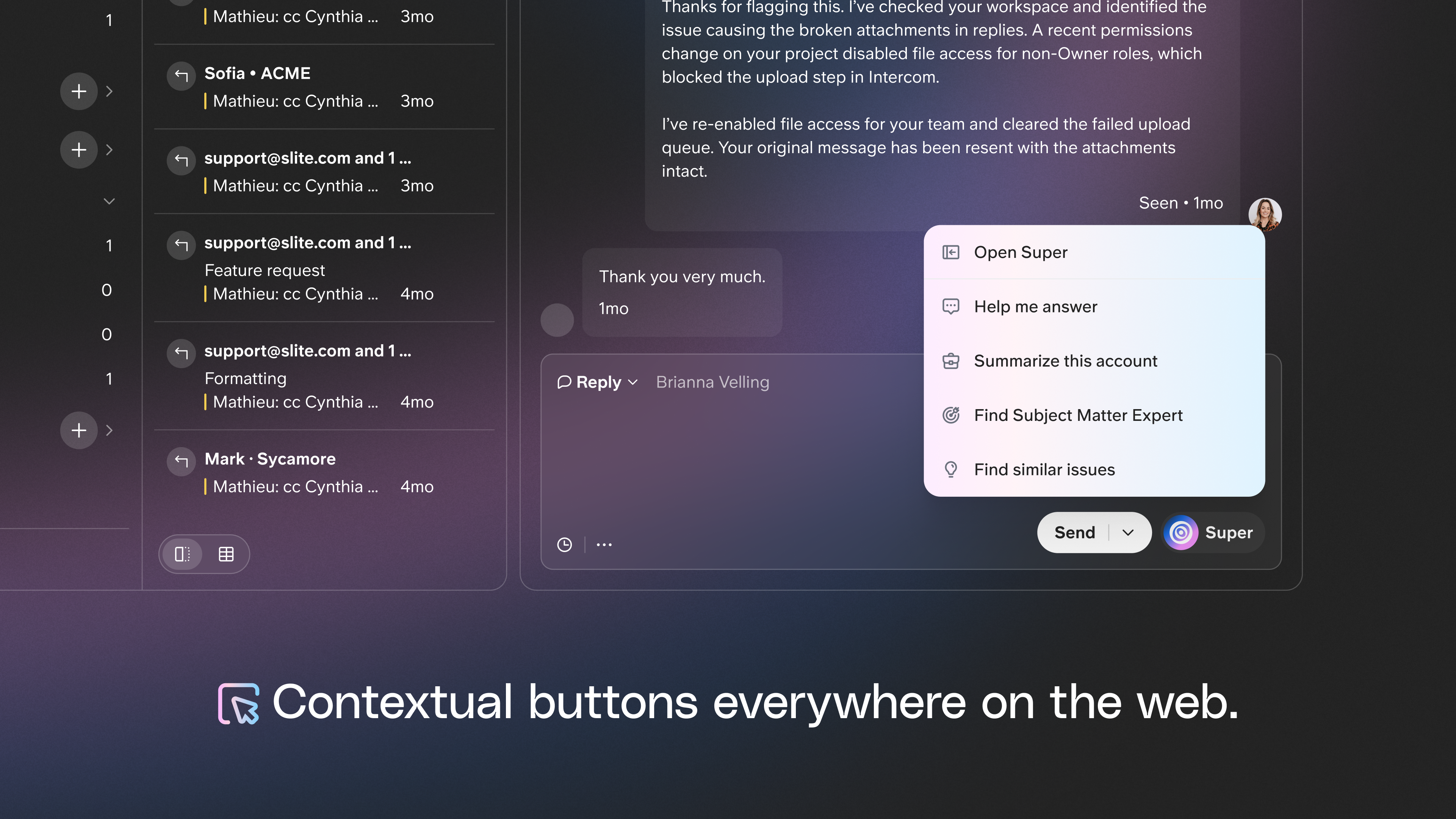
What happens when an agent clicks the contextual button:
- Super reads the current Intercom conversation.
- It pulls relevant context from connected tools like Slack, Linear, GitHub, Google Drive, CRM systems, and help articles.
- It runs predefined AI actions such as drafting a response, summarizing account history, or finding similar past issues.
The key difference from Fin is simple. Fin answers customers using your knowledge base. Super’s contextual button searches across undocumented sources and brings that context into the Intercom ticket, without forcing agents to leave the conversation or search across tools manually.
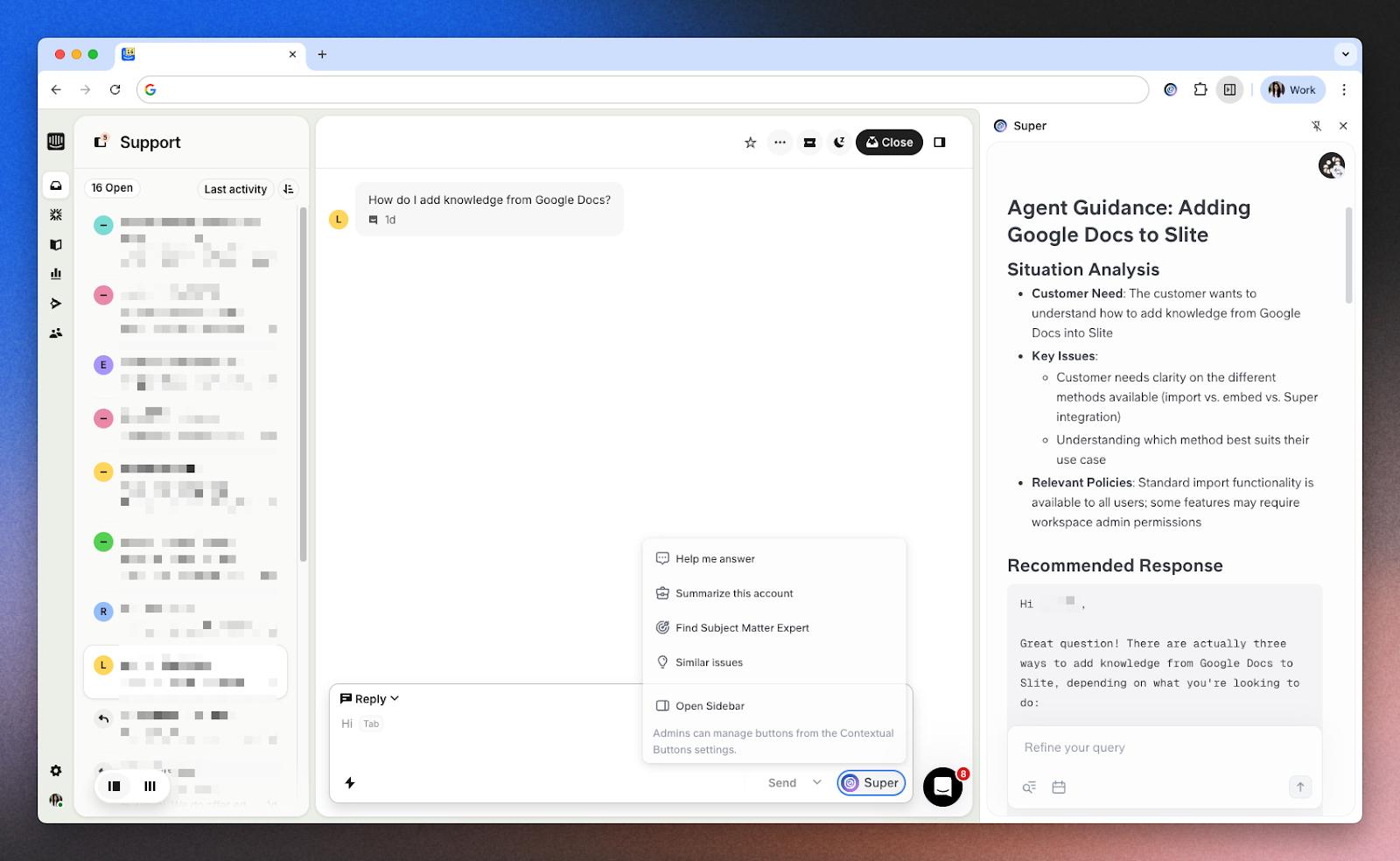
Uscreen’s support team uses Super’s contextual button inside Intercom to handle complex tickets. Agents draft responses using recent bug fixes from Linear, product decisions from Slack conversations, customer history from their CRM, help center articles, and implementation details from past tickets. With this setup, they maintain over 97% CSAT while reducing total handling time.
"Anyone who interacts with customers uses Super because they get weird questions and don't want to just say 'ask support.' These teams can now break down technical information for customers."
Setup is intentionally lightweight. The contextual button requires a simple CSS selector and works instantly in Chrome with the Super Extension installed. Intercom users can start with default preset actions and customize them as their workflows mature. In practice, teams use Fin for automated, customer-facing answers and Super’s contextual button for agent-assisted support when broader, undocumented context is needed.
How to set up your knowledge base for Fin AI
- Audit existing documentation: Look for outdated articles, duplicate content, and missing explanations. Pay close attention to common customer questions that do not have a clear, single source of truth.
- Structure content for AI retrieval: Use clear headings, short paragraphs, and place the answer in the first sentence whenever possible. Avoid burying critical details deep in long articles where they are easy to miss.
- Connect your knowledge sources: In Intercom, navigate to the Fin AI settings and choose which content sources to connect. Once connected, allow time for the initial indexing process to complete before evaluating results.
- Test with real questions: Gather your 20-30 most common customer questions and ask Fin each one directly. Review the responses for accuracy and completeness. When Fin says “I don’t know,” treat it as a signal that important content is missing or unclear.
Best practices to improve Fin AI accuracy
- Put answers first: Start each section with a direct, complete answer. This removes ambiguity and reduces the risk of partial responses. When the answer is buried in background context, AI may miss it or return an incomplete explanation.
- Use consistent formatting: Apply the same structure across similar articles, especially “How to” guides. When steps, requirements, and outcomes appear in predictable places, AI can reliably extract the right information instead of stitching together fragments.
- Keep content current: Outdated articles are the leading cause of incorrect AI answers. Regular review cycles matter. Verification workflows, such as those in Slite, prompt owners to revisit content on a schedule so AI pulls from up-to-date guidance rather than historical behavior.
- Organize by customer intent: Write and title articles based on how customers phrase questions. An intent-based organization improves semantic matching and ensures the AI retrieves content that directly answers what the customer is asking.
Common challenges with Fin AI integration
Teams tend to run into the same issues when deploying Fin. The challenges are usually not technical. They come from how knowledge is created, maintained, and distributed across the company:
- Outdated or conflicting content: This is the most common cause of incorrect answers. When multiple articles say slightly different things, or when old instructions remain live after a change, AI has no way to know which version is correct. Regular content audits, at least quarterly, help surface these conflicts. Assigning clear owners to sections ensures updates happen when products or policies change.
- Fragmented knowledge across tools: Important information often lives in Slack, Google Drive, Notion, and past Intercom conversations. Fin can only retrieve content from sources you explicitly connect, which means critical context may be missing. Teams either consolidate knowledge into a single source of truth, with Slite providing clear ownership and structure, or they use Super’s contextual button to search across fragmented sources when agents are handling Intercom tickets.
- Poor content structure: Documentation written purely for humans to browse does not always work well for AI retrieval. Long narrative articles without clear headings, direct answers, or scannable sections make it difficult for retrieval systems to extract the right information. Clear sections, short paragraphs, and explicit answers reduce ambiguity and improve accuracy.
Why knowledge base quality determines AI success
Fin is only as good as the content it retrieves. You can tune prompts and adjust settings, but the biggest lever is still your knowledge base. When documentation is clear, current, and written around real customer questions, AI answers feel helpful and accurate. When it is fragmented or outdated, AI can only reflect those gaps back to your customers.
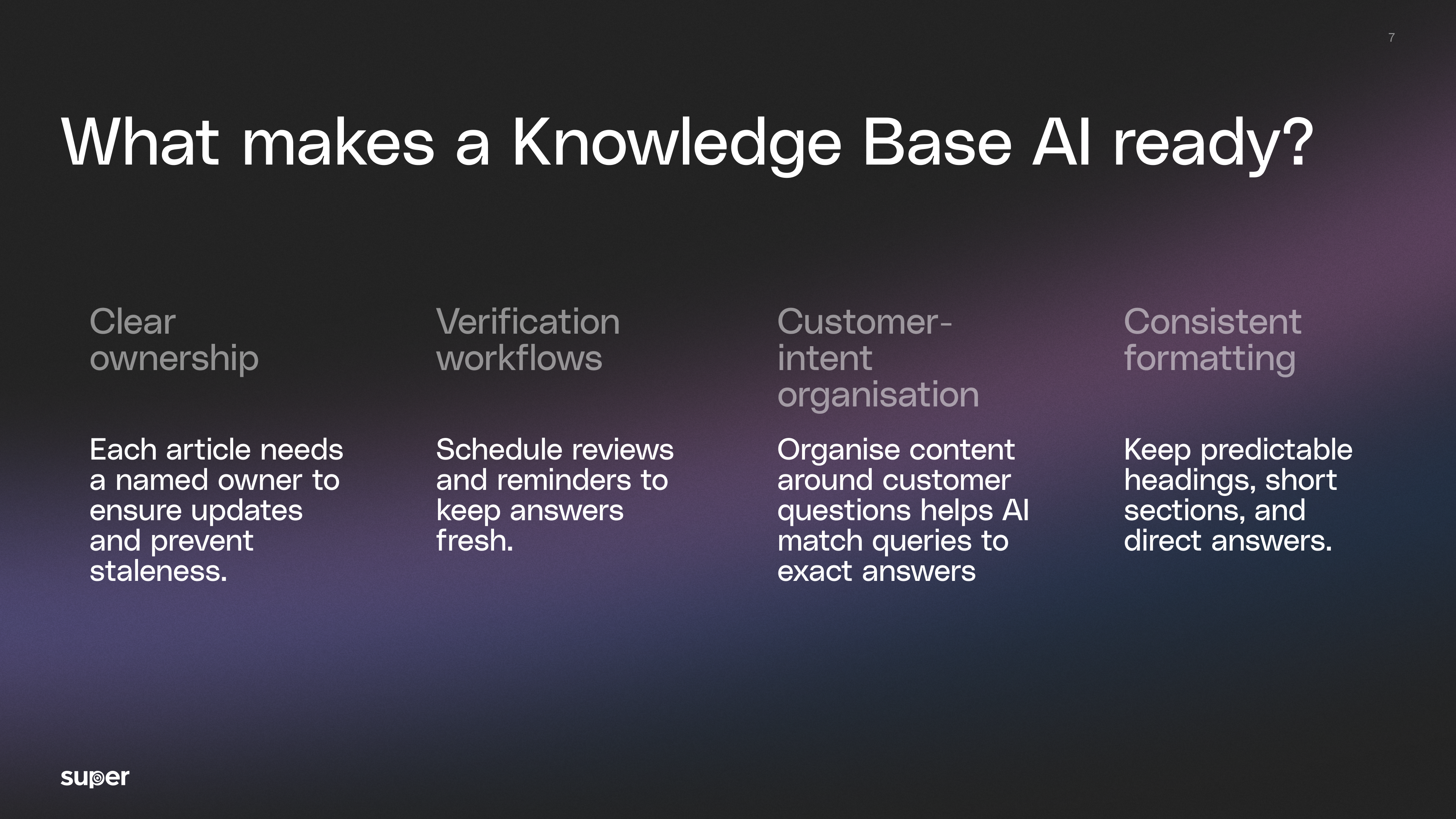
What makes a knowledge base AI-ready:
- Clear ownership: Every article should have a named owner. This removes ambiguity about who updates content when something changes and prevents knowledge from quietly going stale.
- Verification workflows: Content needs scheduled reviews, not one-time publishing. Simple reminders to recheck articles after product changes or policy updates keep answers aligned with reality.
- Customer-intent organization: Articles should be built around the questions customers actually ask. Organizing content by intent makes it easier for AI to match a question to the right answer.
- Consistent formatting: Predictable headings, short sections, and direct answers help AI retrieve and reuse information accurately without misinterpreting context.
From there, teams usually take one of two paths.
If your priority is building a verified, structured knowledge base that keeps Fin accurate as you scale, starting free with Slite gives you that foundation.
If your biggest challenge is knowledge spread across tools that never becomes documentation, exploring Super brings that missing context into Intercom so agents can answer confidently without waiting for perfect docs.

Janhavi Nagarhalli
Janhavi Nagarhalli is a product-led Content Marketer at Factors AI. She writes about the creator economy and personal branding on Linkedin.
Preguntas frecuentes
Can Fin AI work with knowledge bases outside of Intercom?
Yes. Fin can connect to external knowledge sources such as Notion, Confluence, Slite, and public URLs. While native Intercom content offers the tightest integration, external knowledge bases work well when they are structured, current, and clearly written. ###
What does Fin AI do when it cannot find an answer?
Fin is designed to avoid guessing. When it does not have enough reliable information, it will say it does not know and can hand the conversation over to a human agent. This behavior helps maintain customer trust and prevents the spread of incorrect information. ###
How can I see which knowledge base articles Fin uses for a response?
Fin includes citations or source references in its responses. This makes it easy to trace an answer back to the specific articles that informed it and quickly spot gaps or outdated content. ###
Can Super’s contextual button work alongside Fin AI in Intercom?
Yes. Many teams use both together. Fin handles automated customer responses using the knowledge base, while Super’s contextual button supports agents by pulling undocumented context from tools like Slack, Linear, and others directly into Intercom when handling more complex tickets.
¿Listo para potenciar tu flujo de trabajo?
Conecta tus herramientas y empieza a obtener respuestas al instante.
Llevamos creando soluciones para compartir conocimiento y mejorar el trabajo desde 2016.