How to Build an AI Chatbot for Your Team's Data in 2026
Chatbots have become my new favourite tool at work lately. I mean, why scroll through messy drive folders and docs when you can just ask the AI, "Hey, can you find the latest campaign report?" Plus, it saves me the hassle of pinging my team for the same thing for the 10th time.

Chatbots have become my new favourite tool at work lately. I mean, why scroll through messy drive folders and docs when you can just ask the AI, “Hey, can you find the latest campaign report?” Plus, it saves me the hassle of pinging my team for the same thing for the 10th time.
However, building an AI chatbot today is all about making team knowledge easier to access, easier to trust, and easier to use every day. When done well, it becomes a natural part of how your team works, learns, and makes decisions.
In this guide, we will walk through how to build a chatbot for your team's data that actually helps.
What is an AI chatbot
An AI chatbot is software you can talk to in plain language. You ask a question, and it responds with an answer that sounds natural and easy to understand. Instead of clicking through menus or searching through pages, you simply type what you need and get a reply back.
Older chatbots worked more like decision trees. They followed fixed rules and only understood specific commands. If you asked something slightly different, they often got confused or gave unhelpful answers. That is why they felt rigid and frustrating to use.
Modern AI chatbots are different. They use large language models to understand context, meaning, and intent. This allows them to handle open-ended questions, follow the flow of a conversation, and give responses that feel more human and relevant. The result is a tool that feels less like software and more like a helpful assistant.
Why build an AI chatbot for your team
Automation removes friction from how teams access information and complete routine tasks. A team chatbot can naturally fit into your workflow by handling the small but constant questions that accumulate over time.
- Reduce repetitive questions: Teams spend a surprising amount of time answering the same questions again and again. Where is this doc? How does XYZ work? A chatbot trained on company knowledge can handle these automatically, freeing up time and reducing interruptions across the team.
- Speed up employee onboarding: New hires have many questions when they join. A chatbot lets them self-serve answers about tools, processes, and policies without waiting for someone to respond. This is especially valuable for remote teams, where information is often spread across many systems and onboarding can feel slower and more fragmented than in person.
- Make company knowledge instantly searchable: Most team knowledge lives in static documents that are hard to navigate. A chatbot turns that information into something conversational and easy to query. It can act as a single source of truth, answering questions directly inside the tools people already use. Well-organized knowledge in tools like Slite, creates a strong foundation for training a chatbot that gives reliable answers.
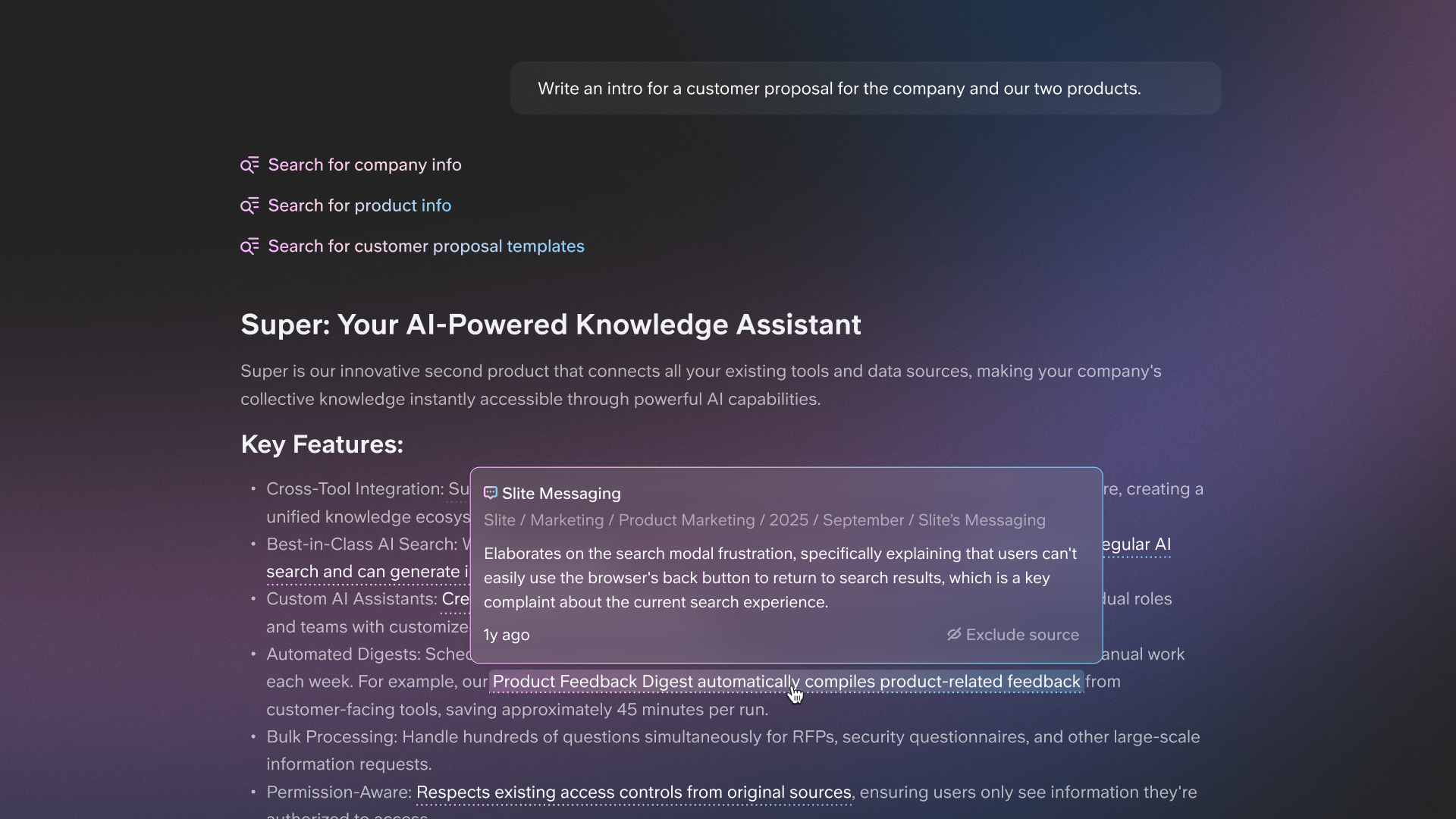
- Free up time for higher-value work: When routine questions are handled automatically, people can focus on tasks that require human judgment. Instead of repeating information, teams spend more time solving complex problems, collaborating, and advancing projects.
How to build an AI chatbot step by step
1. Define your chatbot goals and scope
Start by identifying the main problem you want to solve. Is your team spending too much time answering the same questions? Are new hires struggling to find basic information? Is important product knowledge hard to surface quickly? Once you know the problem, define the specific knowledge areas your chatbot should cover and those that are out of scope.
Common use cases include:
- Internal help desk: Answer common IT, HR, and policy questions without creating more tickets.
- Product knowledge: Help support or sales teams quickly find accurate feature and documentation details.
- Onboarding assistant: Guide new employees through tools, processes, and team norms at their own pace.
Being clear about your chatbot's role early on will guide every decision that follows, from how you structure your data to whether a simple custom GPT is enough or a more tailored setup is needed.
2. Choose your platform and build your first bot
The platform you choose affects how fast you can launch, how much you can customize, and how much time you will spend maintaining the chatbot later. The right choice depends on your team's skills, your timeline, and the complexity of your use case.
At a high level, most chatbot builds fall into three paths. No code tools prioritize speed. Low-code tools balance flexibility and ease of use. Custom code gives you full control but requires more effort.
| Approach | Best for | Technical skill needed | Customisation level | Time to deploy |
|---|---|---|---|---|
| No code platforms | Quick deployment and non-technical teams | None | Limited | Hours to days |
| Low-code platforms | Balance of speed and flexibility | Basic | Moderate | Days to weeks |
| Custom code | Full control and hackability | Advanced | Complete | Weeks to months |
Once you choose a path, you can start building right away.
Option A: No code chatbot (fastest start)
Best for teams that need results today and lack developer resources. A typical example is building a chatbot with Tidio in about 15 minutes:
- Sign up for Tidio. A free tier is available.
- Use the visual builder to create simple conversation flows with drag and drop blocks.
- Connect your knowledge base by uploading FAQs, linking help center articles, or pasting company docs.
- Customize responses by setting the bot's tone, greeting message, and fallback replies.
- Deploy the bot on your website with a single line of code or connect it to tools like Slack, Facebook Messenger, or Instagram.
What you can build includes a customer support bot that answers common questions, a lead qualification bot for sales, or an internal HR assistant for policy questions.
Other no-code options worth exploring include ManyChat for marketing automation, Chatfuel for Facebook Messenger, and Landbot for visual flow-based bots.
Option B: Low code chatbot (more control)
Best for teams with some technical comfort who want more customization without going fully custom. A common choice here is Botpress, which you can get running in one to two hours:
- Create an account on Botpress Cloud. There is a free tier for testing.
- Use the visual flow editor to design conversation paths.
- Add custom logic with small JavaScript snippets for conditions, API calls, or data handling.
- Connect integrations like Slack, Google Sheets, databases, or internal APIs.
- Train the bot using your documents, FAQs, and knowledge base content.
- Test everything in the built in emulator before deploying.
- Deploy to web chat, Slack, Microsoft Teams, WhatsApp, or a custom channel.
What you can build includes a Slack bot that searches your documentation, an onboarding assistant that guides new hires through setup, or an internal tool that pulls answers from multiple systems.
Many teams use this setup to build a RAG chatbot that searches documents and cites sources in its answers. This makes responses easier to trust.
Other low-code options include Voiceflow, which is strong for team collaboration, and Dialogflow, Google's natural language platform.
Option C: Custom Python chatbot (maximum control)
Best for teams with developer resources or very specific requirements. With Python and the OpenAI API, you can build a basic chatbot in a few hours, then extend it over time. A typical setup includes:
- Installing dependencies like openai and python-dotenv.
- Setting up your API key and environment.
- Writing a function to send messages to a language model.
- Maintaining conversation context so the bot remembers what was said.
- Defining a system prompt to control tone and behavior.
To make the chatbot useful with team knowledge, many teams add document search using tools like Langchain:
- Load company documents such as PDFs, markdown files, or text docs.
- Split content into smaller chunks.
- Create embeddings for semantic search.
- Implement retrieval augmented generation so the bot pulls relevant content and cites its sources.
From there, you can deploy the bot wherever your team works. For example, using the Slack Bolt framework, you can create a Slack bot with a slash command that returns answers directly in a thread.
This approach gives you full control over behavior, security, and integrations. The trade off is time and maintenance. You also need to account for API costs, which grow with usage. Some teams reduce costs by running open-source models like Llama or Mistral, which eliminates API fees but requires more setup.
Which option should you choose?
Choosing the right path is about aligning with your team's reality. Your timeline, comfort with technical work, and long-term goals all matter. A chatbot that ships quickly and gets used is far more valuable than a perfect system that never leaves the planning stage.
If you need results today and do not have developer support, no code tools are the fastest way forward. They let you validate the idea, see what questions people actually ask, and prove value with minimal effort.
If your team has basic technical skills and wants more control over logic, integrations, or data sources, low-code platforms offer a strong middle ground. You can shape more advanced experiences without taking on the full burden of building and maintaining everything yourself.
If you need full control, have strict security requirements, or want to deeply customize how the chatbot works, a custom Python build makes sense. This path also works well if your goal is to learn how chatbots work under the hood.
If you are unsure, start simple. Launching a no-code chatbot is often the easiest way to learn what your team actually needs. You can always migrate to a more custom setup later, using real usage data to guide your decisions.
Below are three practical paths you can follow, each with real resources to get started.
Path 1: No code chatbot
Best if you want something live today. Start here:
- Super - Super’s the simplest AI chatbot to deploy. You literally just connect your tools once and deploy it for your team
- Tidio quick start guide - Tidio is a simple one to start on a low budget
- ManyChat - Manychat is limited in its functionality but a great starter
You can build a basic support or internal Q&A bot in under an hour, connect it to existing content, and deploy it where your team already works.
Path 2: Low-code chatbot
Best if you want customization without going fully custom. Start with Botpress. This path is ideal for internal bots that search documents, answer questions in Slack, or guide onboarding with more logic and structure.
Path 3: Custom Python chatbot
Best if you need full control or want to learn deeply. Start here:
This approach lets you design exactly how your chatbot behaves, what data it uses, and where it runs. It takes more time, but offers maximum flexibility.
3. Design conversational flows
This is about mapping the most common paths users will take, from their first message to getting a useful answer. You do not need to script every possible question, but you should plan the key moments that shape the experience.
Start with the basics. Define a clear greeting that sets expectations about what the chatbot can help with. Map common question patterns to direct answers or simple guided flows. Just as important, design what happens when the chatbot does not know the answer. A good fallback response should be honest, offer related topics, or explain how to reach a real person. Escalation to a human is critical for complex or sensitive issues and should feel like a smooth handoff, not a dead end.
One useful testing insight comes from a healthcare team that saw their biggest improvement when the bot learned to say "I don't know." Earlier versions always tried to answer, even when they were wrong. By designing explicit fallback responses instead of letting the chatbot guess, trust increased and frustration dropped.
4. Connect your knowledge sources
The goal is not to dump everything in at once, but to start with the sources your team already trusts and uses most.
Internal docs, wikis, and process documentation are usually the richest and most reliable sources. From there, you can expand to communication tools, cloud storage, and public resources like help centers. The more organized and up-to-date your sources are, the more accurate and useful your chatbot's answers will be.
A concrete example comes from Taranis, who built an internal developer chatbot using the open-source RAG-Chatbot-with-Confluence project.
Their goal was simple: reduce the time engineers spent searching across documentation and repositories.
By connecting documentation directly to Slack, they made asking a question faster than opening a wiki.
- Knowledge sources: Confluence documentation, GitHub repositories
- Technical approach: LangChain + Retrieval Augmented Generation (RAG)
- Access point: Slack slash command (/devask)
- Outcome: Less time searching docs, more time writing code
Finally, the foundation matters more than most teams expect. A chatbot can only be as reliable as the knowledge it draws from.
Tools like Slite, which emphasize clear ownership, verification workflows, and up-to-date documentation, give chatbots a structured and trustworthy base. When your knowledge stays current and well organized, your chatbot's answers do too, without constant retraining or manual fixes.
5. Train the chatbot on your data
This step defines the bot's personality, its limits, and the standards it follows when answering questions. Without clear training instructions, even a well-connected chatbot can sound inconsistent, overconfident, or vague.
At this stage, focus on configuring the core training elements that guide the chatbot's behavior:
- Define the bot's tone: Decide how the chatbot should sound. Helpful and professional, casual and friendly, or technical and precise. Consistency matters more than style, especially for internal trust.
- Set boundaries: Clearly specify what topics the chatbot should answer and which it should decline. Define when it should escalate questions to a human, especially for sensitive, legal, or people-related issues.
- Provide example responses: Show the chatbot what "good" looks like. Include ideal answer length, structure, formatting, and level of detail so responses stay consistent.
- Configure fallback responses: Decide exactly what the chatbot should say when it does not know the answer. Honest, calm responses like "I don't have information about that" build more trust than confident guessing.
- Add source citation rules: Define whether the chatbot should always cite sources, when citations are required, and how they should appear (links, document titles, or inline references).
How you apply these elements depends on your setup. No-code platforms usually handle training through settings panels, toggle options, and example Q&A pairs. In custom or Python-based implementations, these rules live in system prompts, for example: "You are a helpful internal assistant for Acme Corp. Answer questions about company policies, IT support, and benefits. Always cite the specific document or page where you found the answer.
If you don't know, say 'I don't have information about that' instead of guessing." These instructions become the backbone of consistent, reliable answers as usage grows.
6. Test for accuracy
Before launching your chatbot to the team, you need to pressure test it in real conditions. Accuracy is the fastest way to build or lose trust. Even a single confidently wrong answer can cause people to stop using the bot altogether. Thorough testing helps you uncover gaps in knowledge, unclear responses, and edge cases where the chatbot should escalate or say it does not know.
Use a simple testing framework so results are consistent and actionable:
1. Create a question bank with real questions your team actually asks
- Easy: "What's our PTO policy?" "How do I reset my password?"
- Medium: "How do I configure SSO for new team members?"
- Difficult: "What's the approval process for hiring contractors across multiple countries?"
2. Grade response quality using consistent criteria
- Accurate: Does the answer contain correct information?
- Complete: Does it fully address the question?
- Sourced: Are citations and sources appropriate?
- Clear: Is the response easy to understand?
- Timely: Does it respond within an acceptable time frame?
3. Iterate based on results
Track which questions fail, where answers are incomplete, and what knowledge gaps exist. Look for patterns rather than one-off errors, then improve training data, prompts, and documentation accordingly. Over time, this feedback loop is what turns a chatbot into a reliable part of daily work.
7. Deploy to your team
Deployment is not just a technical step; it is a product decision. The goal is to make asking the chatbot easier than searching a doc or asking a colleague.
Deployment channels:
- Slack and team messaging integrations: The most common choice for internal chatbots. Slash commands like /devask let developers ask questions directly in Slack and receive answers in real time, without switching context.
- Web applications and browser extensions: Standalone web interfaces or Chrome extensions give quick access from anywhere, especially useful for teams that work across multiple tools.
- Embedded widgets and contextual buttons: Chatbot access is built directly into other tools your team uses, so help appears exactly when and where it's needed.
Deployment timeline: Most teams complete chatbot implementations in about a week, while more complex enterprise setups can take up to a month. Start by deploying the chatbot to handle frequently asked questions and basic support needs. Once it is live, collect data on what users actually ask, where the chatbot falls short, and which follow-up actions would be most helpful to automate next.
Build vs buy: When to use a ready-made solution
Before you invest months of developer time building a custom chatbot, it is worth asking whether buying an existing solution makes more sense. Building often sounds straightforward, but the real costs tend to appear only after the first version ships and people start relying on it every day. If you are weighing these options, our full breakdown on building vs buying enterprise search goes deeper into the trade-offs.
The reality of building your own chatbot
Uscreen's Co-Founder & CTO, Nick, spent nights building a Slack bot that connected to Google Drive and their help center. Before that, the team had already tried Guru (too complex), Intercom's knowledge base (they had outgrown it), and even a homegrown AI tool. None of them stuck. According to Mark Weisberg, Support Manager, the breaking point came when they recognized the hidden costs of building:
- Ongoing maintenance burden: Custom tools often require more time to maintain than to build initially
- Data complexity: Company knowledge is fragmented and contradictory across platforms, requiring sophisticated filtering and conflict handling
- UX problems: Chat interfaces bury sources in conversation flows, making answers hard to verify
- Hallucination issues: Custom bots confidently provide wrong answers instead of saying "I don't know"
- Developer opportunity cost: Nick was building at night because this was not the highest-value use of engineering time
Why Uscreen switched
When Nick discovered Super, the realization was immediate: "Super was what Nick was trying to build, but already done and on steroids." After switching, Uscreen maintained 97–98% CSAT while decreasing handle times. Mark can now create comprehensive documentation for any new feature in about 30 seconds, instead of piecing context together across tools. Read their full case study here.
What Super actually is
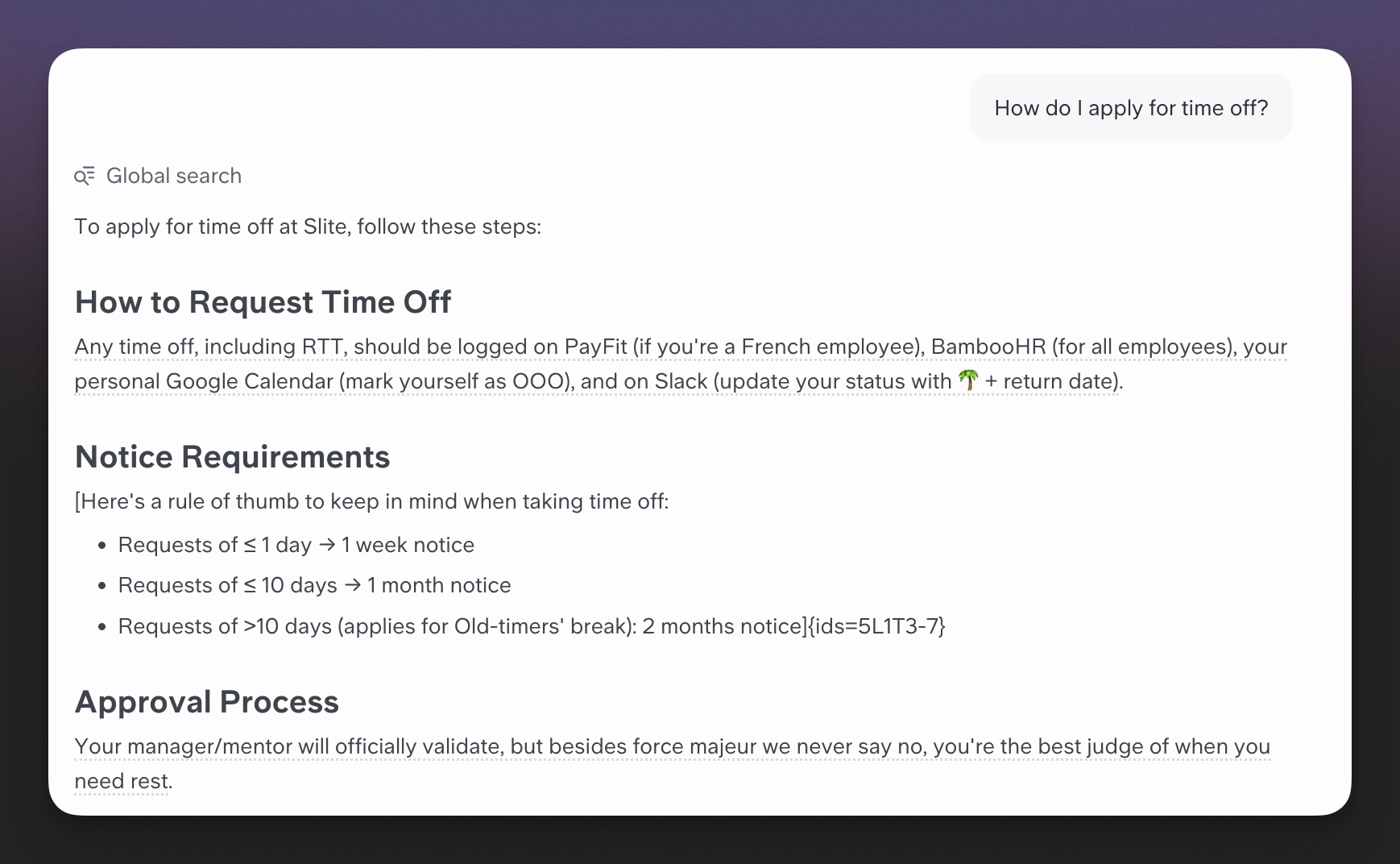
Super is the chatbot you would build if you had unlimited time and resources: an AI agent that connects to all your company data and delivers answers instantly, with sources. Instead of building integrations yourself, Super connects out of the box to over 20 tools including Slack, Google Drive, Notion, Confluence, Jira, Linear, GitHub, Intercom, and more. Instead of struggling with hallucinations and trust, it cites sources, respects permissions, and clearly says "I don't know" when information is missing.
How Super works
- Connect your tools: Slack, Notion, Google Drive, Confluence, Jira, Linear, GitHub, Intercom, and 20+ other sources, wherever your knowledge lives
- Ask questions naturally: Search across all tools with a single query via Slack, browser extension, or web app
- Get sourced answers: Every response shows exactly where the information came from, with links to originals
- Stay up to date: Super automatically syncs data from connected tools, with no manual retraining
- Ask 100s of RFP questions in one go with verified sources using Bulk Mode
- Set recurring digests for your team to receive on Slack/email every week
When building still makes sense
- Search capabilities directly generate revenue as a product feature
- Requirements are extremely unique and not addressed by commercial solutions
- You have dedicated AI or ML capacity with no higher-priority work
- You are prepared for 12+ months of development and ongoing maintenance
For most internal chatbots that help teams find information across their tools, buying a ready-made solution like Super delivers value faster, without the long-term engineering overhead.
Build an AI chatbot on your team knowledge today
The best chatbot is not the most sophisticated one, it is the one your team actually uses. Focus on removing friction, not adding complexity. Once people trust the answers and form the habit of using the chatbot, you can expand its scope and capabilities with confidence.
For teams that want AI-powered search and answers without spending months building infrastructure, Super offers a fast way to connect all your tools and start getting reliable, sourced answers right away.
If you are building a documentation foundation that makes chatbots genuinely useful and trustworthy, you can start for free with Slite and put the structure in place that your AI will rely on every day.
How to Build an AI Chatbot for Your Team’s Knowledge
AI chatbots are becoming a core part of how modern teams work. Instead of digging through folders, pinging teammates, or hunting through scattered tools, you can ask a question in plain language and get a clear, sourced answer.
This guide walks through what an AI chatbot is, why it’s useful for teams, and how to build (or buy) one that actually helps.
What is an AI chatbot?
An AI chatbot is software you interact with in natural language. You type a question, and it responds with a human-like answer.
Older chatbots were rule-based: they followed decision trees and only understood narrow commands. If you phrased something differently, they often failed.
Modern AI chatbots use large language models (LLMs) to understand context, intent, and nuance. They can:
- Handle open-ended questions
- Follow multi-step conversations
- Adapt to different phrasings
The result is a tool that feels more like a helpful assistant than a rigid script.
Why build an AI chatbot for your team?
A team chatbot reduces friction in everyday work by answering repetitive questions and surfacing knowledge instantly.
Key benefits
- Reduce repetitive questions
Teams repeatedly answer: Where is this doc? How does X work? A chatbot trained on internal knowledge can answer these automatically, especially when embedded in tools like Slack.
- Speed up onboarding
New hires can self-serve answers about tools, processes, and policies instead of waiting for responses. This is especially valuable for remote teams with fragmented information.
- Make knowledge instantly searchable
Instead of static docs that are hard to navigate, a chatbot turns knowledge into a conversational, searchable interface. It can act as a single source of truth inside tools people already use.
- Free up time for higher-value work
When routine questions are automated, people can focus on deep work, collaboration, and problem-solving.
Step-by-step: How to build an AI chatbot
1. Define your chatbot goals and scope
Start with the problem:
- Are people asking the same questions repeatedly?
- Are new hires struggling to find basic info?
- Is product or process knowledge hard to surface quickly?
Then define:
- What the chatbot should cover (e.g., HR policies, IT help, product docs)
- What is out of scope (e.g., legal advice, performance reviews)
Common internal use cases:
- Internal help desk – IT, HR, policy FAQs
- Product knowledge – support/sales access to accurate feature info
- Onboarding assistant – guides new hires through tools and processes
Clear scope will guide data structure, platform choice, and complexity.
2. Choose your platform and build your first bot
Your platform choice affects speed, customization, and maintenance.
Approaches
- No code – fastest, minimal control
- Low code – balance of speed and flexibility
- Custom code – maximum control, highest effort
Below is a quick comparison.
3. Design conversational flows
You don’t need to script everything, but you should design the key paths:
- Greeting – set expectations: what the bot can and can’t do
- Common questions – map typical intents to clear answers or short flows
- Fallbacks – what happens when the bot doesn’t know
- Escalation – how and when to hand off to a human
A critical design choice is teaching the bot to say “I don’t know” instead of guessing. One healthcare team saw trust improve dramatically when they added explicit fallback responses instead of letting the model improvise.
Good fallback behavior:
- Be honest: “I don’t have information about that yet.”
- Offer alternatives: related topics or docs
- Provide a path: how to contact a human
4. Connect your knowledge sources
Start with the most trusted, up-to-date sources instead of dumping everything at once.
Typical sources:
- Internal docs and wikis
- Process documentation
- Help centers and FAQs
- Repositories and issue trackers
- Cloud storage (Drive, Notion, Confluence, etc.)
Example: Taranis developer chatbot
- Goal: Reduce time engineers spend searching docs and repos
- Sources: Confluence docs + GitHub repositories
- Tech: LangChain + Retrieval Augmented Generation (RAG)
- Access: Slack slash command (
/devask) - Outcome: Less time searching, more time coding
They used the open-source project RAG-Chatbot-with-Confluence to wire Confluence and GitHub into Slack. Asking a question in Slack became faster than opening the wiki.
The quality of your knowledge base matters. Tools like Slite, with ownership, verification workflows, and structured docs, give your chatbot a reliable foundation.
5. Train the chatbot on your data
Training is about behavior, not just data. You’re defining:
- Tone – professional, casual, technical, etc.
- Boundaries – what it answers vs. what it defers
- Examples – what a “good” answer looks like
- Fallback rules – how it responds when unsure
- Citation rules – how and when to show sources
Key elements:
- Bot tone: e.g., “Helpful, concise, and friendly. Avoid jargon unless the user uses it first.”
- Scope & limits: e.g., “Answer only about company policies, IT, and benefits. For legal or HR-sensitive issues, direct users to HR.”
- Example responses: Include examples with ideal length, structure, and formatting.
- Fallbacks: e.g., “I don’t have information about that yet. You can try searching the HR handbook or ask #people-ops.”
- Citations: e.g., “Always cite the document name and link where the answer comes from.”
In no-code tools, you configure this via settings and Q&A pairs. In custom setups, you encode it in system prompts, such as:
“You are a helpful internal assistant for Acme Corp. Answer questions about company policies, IT support, and benefits. Always cite the specific document or page where you found the answer. If you don’t know, say ‘I don’t have information about that’ instead of guessing.”
6. Test for accuracy
Trust hinges on accuracy. A few confidently wrong answers can kill adoption.
1. Build a question bank
Use real questions from your team, at different difficulty levels:
- Easy: “What’s our PTO policy?” “How do I reset my password?”
- Medium: “How do I configure SSO for new team members?”
- Hard: “What’s the approval process for hiring contractors across multiple countries?”
2. Define grading criteria
Evaluate each answer on:
- Accurate – Is the information correct?
- Complete – Does it fully answer the question?
- Sourced – Are citations present and appropriate?
- Clear – Is it easy to understand?
- Timely – Is the response fast enough?
3. Iterate
Track failures and partial answers, then:
- Improve documentation where gaps appear
- Refine prompts and training examples
- Add or reorganize knowledge sources
Over time, this feedback loop turns the chatbot into a dependable daily tool.
7. Deploy to your team
Deployment is a product decision: the chatbot should be easier to use than searching or asking a colleague.
Common channels:
- Slack / team chat
Slash commands (e.g., /devask) or direct messages to a bot. Ideal for internal Q&A.
- Web apps / browser extensions
A standalone web UI or Chrome extension for quick access across tools.
- Embedded widgets
Chat widgets inside existing tools or intranet pages, so help appears in context.
Timeline: Many teams can launch a basic internal chatbot in about a week; complex enterprise setups may take up to a month.
Start small: handle FAQs and basic support first. Once live, use real usage data to decide what to automate next.
Build vs buy: When to use a ready-made solution
Before committing months of engineering time, weigh building vs buying.
The reality of building your own
Uscreen’s CTO, Nick, built a Slack bot that connected to Google Drive and their help center. Before that, they tried:
- Guru (too complex)
- Intercom’s knowledge base (outgrown)
- A homegrown AI tool (didn’t stick)
According to Mark Weisberg, Senior Manager of Technical Services, the hidden costs of building included:
- Ongoing maintenance – often more time than initial build
- Data complexity – fragmented, conflicting knowledge across tools
- UX challenges – chat UIs can bury sources and make verification harder
- Hallucinations – bots confidently giving wrong answers
- Opportunity cost – engineering time pulled from higher-value work
Why Uscreen switched to Super
When Nick found Super, it matched what he was trying to build—already done and more advanced.
After switching:
- They maintained 97–98% CSAT
- Handle times decreased
- Mark could create comprehensive documentation for new features in ~30 seconds instead of stitching context manually
What Super is
Super is essentially the chatbot you’d build if you had unlimited time and resources:
- Connects to 20+ tools (Slack, Google Drive, Notion, Confluence, Jira, Linear, GitHub, Intercom, etc.)
- Answers questions with sources and links
- Respects permissions
- Clearly says “I don’t know” when information is missing
How Super works
- Connect your tools: Slack, Notion, Google Drive, Confluence, Jira, Linear, GitHub, Intercom, and more
- Ask questions naturally: One query searches across all connected tools via Slack, browser extension, web app, or API
- Get sourced answers: Every answer shows where it came from, with links
- Stay up to date: Automatic syncing; no manual retraining
When building still makes sense
Building your own chatbot can be the right choice if:
- Search is a core product feature that drives revenue
- Your requirements are highly unique and not covered by existing tools
- You have dedicated AI/ML capacity with no higher-priority work
- You’re prepared for 12+ months of development and ongoing maintenance
For most internal knowledge chatbots, buying a solution like Super delivers value faster and avoids long-term engineering overhead.

Janhavi Nagarhalli
Janhavi Nagarhalli is a product-led Content Marketer at Factors AI. She writes about the creator economy and personal branding on Linkedin.
Frequently Asked Questions
What's the difference between AI chatbots and rule-based chatbots?
AI chatbots use large language models to understand context, intent, and meaning, allowing them to generate flexible, conversational responses and handle open-ended questions. Rule-based chatbots rely on predefined decision trees and scripted paths. They can only respond to specific inputs they have been programmed for, which makes them predictable but limited and often frustrating outside narrow use cases.
How much does it cost to build an AI chatbot?
Costs vary widely depending on your approach. No-code platforms often offer free tiers, with paid plans typically starting around $15–50 per month. Low-code tools usually fall into a mid-range monthly cost. Custom Python implementations require significant developer time, often weeks to months plus ongoing API costs for language models from providers like OpenAI, which increase with usage.
What programming language is best for building chatbots?
Python is the most popular language for custom chatbot development due to its strong ecosystem of AI, machine learning, and natural language processing libraries. That said, many teams successfully build and deploy chatbots without writing any code at all by using modern no-code and low-code platforms.
Can I build my own AI chatbot without coding?
Yes. No-code platforms like Tidio, ManyChat, and Voiceflow allow you to build functional AI chatbots using visual interfaces. You can connect data sources, configure responses, and define behavior without writing code, making this a practical option for non-technical teams.
How long does it take to build a functional AI chatbot?
With no-code tools, you can often have a basic chatbot running in a few hours or days. More sophisticated implementations with integrations, document search, and testing usually take a few weeks. Fully custom-coded solutions tend to take weeks to months, depending on scope and complexity.
How do I keep my chatbot secure when using sensitive company data?
Choose platforms that support role-based permissions and encrypt data both in transit and at rest. Review how your provider stores, processes, and accesses information, especially for internal or regulated data. Most enterprise-grade tools include security controls designed for sensitive company knowledge. If maximum control is required, self-hosted or open-source solutions can be a good option, though they come with added maintenance responsibility.
Ready to supercharge your workflow?
Connect your tools and start getting instant answers.
We've been building solutions for knowledge sharing and better work since 2016.